VSA system indicator does not come on
- Turn the ignition switch ON (II), and watch the VSA system indicator.
- Does the VSA system indicator come on?
- YES
- The system is OK at this time.
- NO
- Go to step 2.
- Turn the ignition switch OFF, then turn it ON (II) again.
- Does the brake system indicator come on?
- YES
- Go to step 3.
- NO
- Repair open in the indicator power source circuit.
- Blown BACK UP LIGHT (7.5A) fuse.
- Open in the wire between the BACK UP LIGHT (7.5A) fuse and gauge assembly.
- Open circuit inside the fuse box.
- Open on the printed circuit board in the gauge assembly.
- Turn the ignition switch OFF.
- Disconnect VSA control unit connector B (16P).
- Turn the ignition switch ON (II).
- Does the VSA system indicator come on?
- YES
- Check for loose terminals in the VSA control unit connectors. If necessary, substitute a known-good VSA control unit, and recheck.
- NO
- Go to step 6.
- Check the VSA system indicator bulb in the gauge assembly.
- Is the bulb OK?
- YES
- Go to step 7.
- NO
- Replace the VSA system indicator bulb.
- Turn the ignition switch OFF.
- Remove the gauge assembly.
- Disconnect gauge assembly connector A (30P).
- Check for continuity between gauge assembly connector A (30P) terminal No. 20 and body ground.
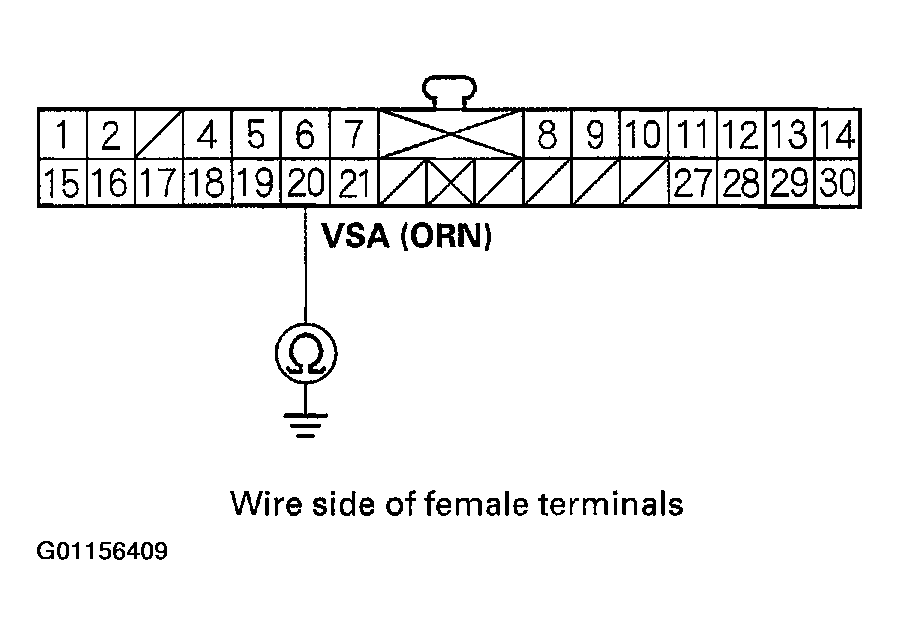 Courtesy of AMERICAN HONDA MOTOR CO., INC.
- Is there continuity?
- YES
- Repair short to body ground in the wire between the gauge assembly and the VSA control unit.
- NO
- Go to step 11.
- Connect gauge assembly connector A (30P), and disconnect gauge assembly connector C (14P).
- Check for continuity between gauge assembly connector C (14P) terminal No. 10 and body ground.
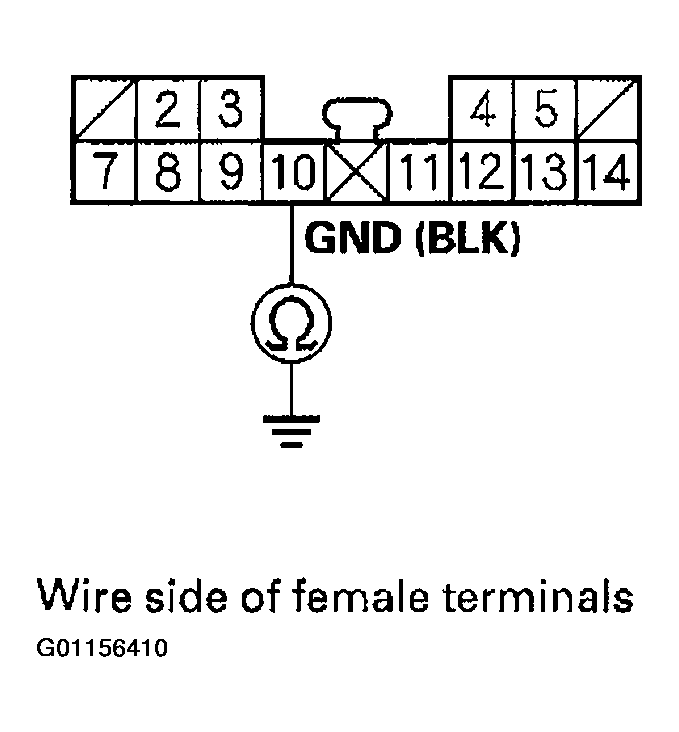 Courtesy of AMERICAN HONDA MOTOR CO., INC.
- Is there continuity?
- YES
- Check for loose terminals in the gauge assembly connectors. If the connectors are OK, replace the printed circuit board in the gauge assembly.
- NO
- Repair open in the wire between the gauge assembly and body ground (G501).