How to Retrieve DTCs
- With the ignition switch OFF, connect the HDS to the data link connector (DLC) (A) under the left side of the dashboard.
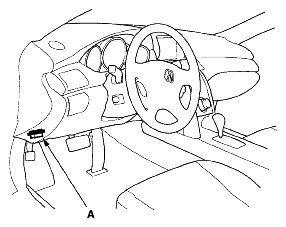 Courtesy of AMERICAN HONDA MOTOR CO., INC.
- Turn the ignition switch ON (II).
- Make sure the HDS communicates with the vehicle and the ACC unit. If it does not communicate, troubleshoot the DLC circuit (see
DLC CIRCUIT TROUBLESHOOTING
).
- Follow the prompts on the HDS to display the DTC(s) on the screen. After determining the DTC, refer to the DTC TROUBLESHOOTING .
NOTE:
- See the HDS Help menu for specific instructions.
- Before troubleshooting, always verify that you have the latest version of the HDS software.