Alternator Removal and Installation: Removal
- Remove the engine compartment covers (see
ENGINE COMPARTMENT COVER REPLACEMENT
)
- Do the battery terminal disconnection procedure (see
BATTERY TERMINAL DISCONNECTION AND RECONNECTION
)
- Raise the vehicle on the lift
- Remove the splash shield (see
FRONT SPLASH SHIELD REPLACEMENT
)
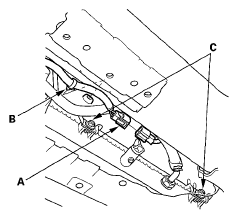
- Disconnect the A/C condenser fan motor connector (A) and remove the harness clamp (B)
 Courtesy of AMERICAN HONDA MOTOR CO., INC.
- Loosen the A/C condenser fan shroud mounting bolts (C)
- Lower the vehicle on the lift
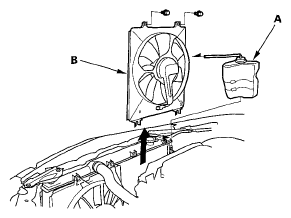
- Remove the coolant reservoir (A), then remove the A/C condenser fan shroud assembly (B)
 Courtesy of AMERICAN HONDA MOTOR CO., INC.
- Remove the drive belt (see
DRIVE BELT REPLACEMENT )
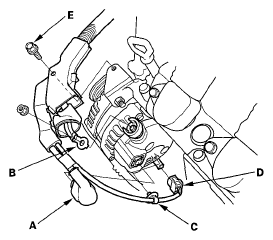
- Disconnect the alternator connector (A) and the positive alternator cable (B) from the alternator
 Courtesy of AMERICAN HONDA MOTOR CO., INC.
- Remove the harness clamp (C) from the alternator and disconnect the A/C compressor clutch connector (D) from the A/C compressor
- Remove the bolt (E) securing the harness holder
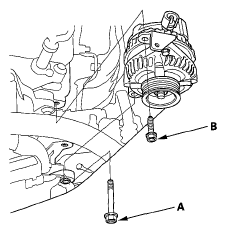
- Remove the mounting bolt (A) and the alternator bracket mounting bolt (B), then remove the alternator
 Courtesy of AMERICAN HONDA MOTOR CO., INC.