CMBS OFF Switch Test/Removal/Installation
- Remove the driver's outer dashboard trim (see
DRIVER'S OUTER DASHBOARD TRIM REMOVAL/INSTALLATION
).
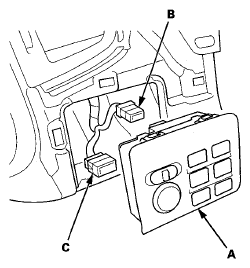
- Remove the multi switch (built-in CMBS OFF switch) (A), then disconnect the multi switch 12P connector (B) and the power mirror switch 13P connector (C).
 Courtesy of AMERICAN HONDA MOTOR CO., INC.
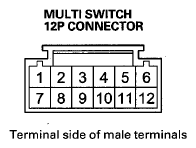
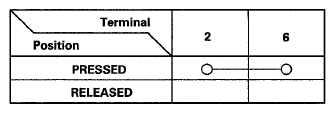
- On the switch side, check for continuity between the multi switch 12P connector terminal in each switch position according to the table.
 Courtesy of AMERICAN HONDA MOTOR CO., INC.
 Courtesy of AMERICAN HONDA MOTOR CO., INC.
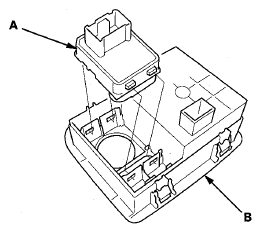
- If the continuity is not as specified, remove the power mirror switch (A), then replace the multi switch (built-in CMBS OFF switch) (B).
 Courtesy of AMERICAN HONDA MOTOR CO., INC.
- Install the multi switch (built-in CMBS Off switch) in the reverse order of removal.