Code Verification
- Note location of Auto-Check button between coolant temperature gauge and tachometer (of the 2 buttons in this location, this is the button that is farthest to the left.) This button also controls the instrument panel illumination lights.
- With ignition off, push and hold Auto-Check button. Turn ignition on. The code 52 should appear in display window.
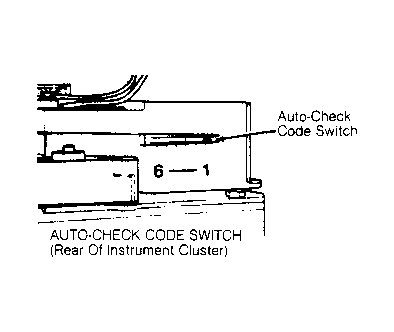
- If code 52 does not appear in display window, turn ignition off. Remove instrument cluster, leaving connectors attached. Slide code switch on back of instrument cluster to set code. See Fig 1
.
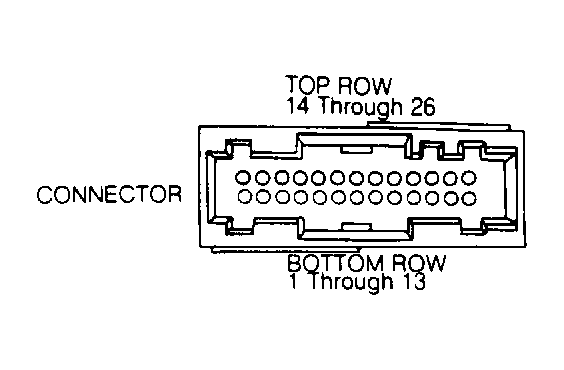
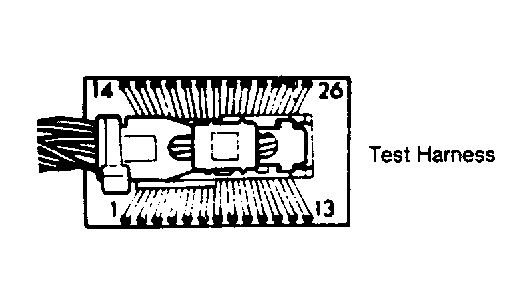
- If first digit of code is not 5, turn off ignition. Connect ohmmeter between ground and terminal No. 3 of White 26-pin connector on back of instrument cluster. See Fig 2
and Fig 3
.
- If there is no continuity, repair short or open circuit. If there is continuity but the first digit code 5 is still not displayed, check voltage supply and output signals. If code is still not correct, replace Auto-Check module.
 Courtesy of AUDI OF AMERICA, INC.
 Courtesy of AUDI OF AMERICA, INC.
 Courtesy of AUDI OF AMERICA, INC.
 Courtesy of AUDI OF AMERICA, INC.