DSLP Mode Switch Inoperative
- Start engine. Depress each IPC function button. If all functions, speedometer and tachometer are inoperative, go to next step. If some functions, speedometer or tachometer are operative, go to step 6).
- Turn ignition switch to OFF position. Check IGN 1 fuse in rear junction block. See COMPONENT LOCATIONS
table. If fuse is blown, go to next step. If fuse is okay, go to step 4).
- Locate and repair short to ground in Pink wire between rear junction block and IPC. Replace IGN 1 fuse. Recheck system operation.
- Check for open in Pink wire between rear junction block and IPC. If open is found, go to next step. If circuit is okay, go to step 14).
- Repair open in Pink wire between rear junction block and IPC. Recheck system operation.
- Turn ignition switch to ON position. Connect scan tool to Data Link Connector (DLC). See COMPONENT LOCATIONS
table. Select IPC INPUTS on scan tool display menu. Depress DSPL MODE button. If DSPL MODE input on scan tool display switches from ON to OFF, go to step 14). If DSPL MODE input on scan tool display does not switch from ON to OFF, go to next step.
- Depress ENG/MET button on IPC. If ENG/MET function is operative, go to next step. If ENG/MET function is inoperative, go to step 11).
- Turn ignition switch to OFF position. Disconnect left side DIC switch connector. See DRIVERS INFORMATION CENTER (DIC) SWITCHES
under REMOVAL & INSTALLATION. Connect fused jumper between left side DIC switch connector terminals No. 6 (Pink wire) and No. 7 (Black/White wire). See Fig 1
. Turn ignition switch to ON position. Connect and disconnect fused jumper and monitor DIC. If DIC displays a message, go to step 13). If DIC does not display a message, go to next step.
- Check for open or short to ground in Pink wire between IPC and left side DIC switch. If problem is found, go to next step. If circuit is okay, go to step 14).
- Repair open or short to ground in Pink wire between IPC and left side DIC switch. Recheck system operation.
- Check for open in Black/White wire between IPC and left side DIC switch. If problem is found, go to next step. If circuit is okay, go to step 13).
- Repair open in Black/White wire between IPC and left side DIC switch. Recheck system operation.
- Replace left side DIC switch. See DRIVERS INFORMATION CENTER (DIC) SWITCHES
under REMOVAL & INSTALLATION. Recheck system operation.
- Replace IPC. See INSTRUMENT PANEL CLUSTER
under REMOVAL & INSTALLATION. Recheck system operation.
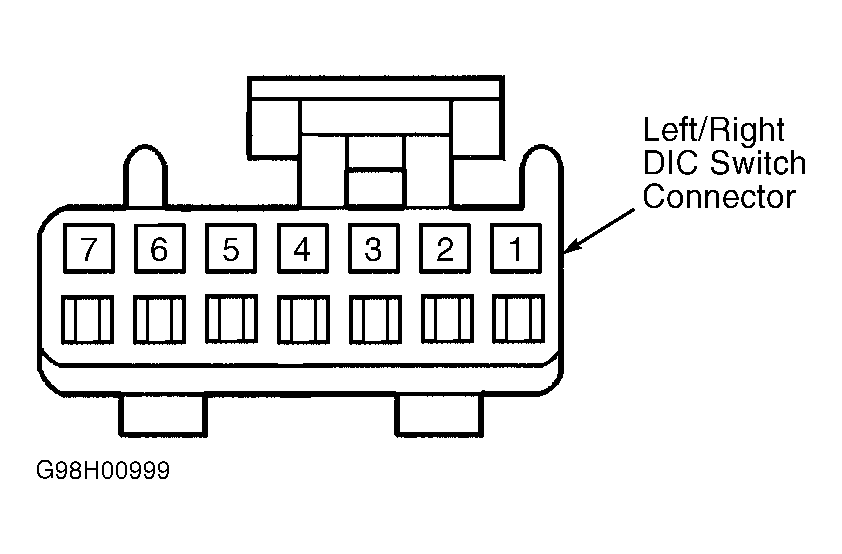 Courtesy of GENERAL MOTORS CORP.