Test K: Memory Seat Feature Inoperative
- If power seat diagnostic system check has been performed, go to next step. If power seat diagnostic system check has not been performed, perform POWER SEATS DIAGNOSTIC SYSTEM CHECK
under SELF-DIAGNOSTIC SYSTEM.
- Verify power seat complaint by operating seat switches in all directions. If power seats operate normally, test for intermittents. See PRELIMINARY INSPECTION
under TROUBLE SHOOTING. If power seats do not operate normally, go to next step.
- Connect scan tool to Data Link Connector (DLC). DLC is located under left side of instrument panel. Turn ignition switch to RUN position. Using scan tool, navigate to SETTINGS OPTIONS screen by making following selections, DASH INTEGRATION MODULE, SPECIAL FUNCTIONS, SET OPTIONS, PERSONALIZATION OPTION. Follow on-screen instructions verifying that PERSONALIZATION OPTION is activated. If personalization option is activated, go to next step. If personalization option is not activated, activate personalization option. See PROGRAMMING in BODY CONTROL MODULES - DEVILLE article.
- Turn headlights on. Using scan tool, observe MEMORY RECALL SWITCHES parameter in Driver Door Module (DDM) data list. Press memory SET button. If scan tool displays SET, go to next step. If scan tool does not display, go to step 8
.
- Using scan tool, observe MEMORY RECALL SWITCHES parameter in DDM data list. Press memory 1 button. If scan tool displays MEMORY 1, go to next step. If scan tool does not display MEMORY 1, go to step 10
.
- Using scan tool, observe MEMORY RECALL SWITCHES parameter in DDM data list. Press memory 2 button. If scan tool displays MEMORY 2, go to next step. If scan tool does not display MEMORY 2, go to step 11
.
- Using scan tool, observe MEMORY RECALL SWITCHES parameter in DDM data list. Press EXIT button. If scan tool displays EXIT, go to step 17
. If scan tool does not display EXIT, go to step 16
.
- Disconnect memory function switch White 5-pin harness connector. Connect fused (3-amp) jumper wire between ground and memory function switch harness connector terminal No. 3 (Orange wire). See Fig 1
. Using scan tool, observe MEMORY RECALL SWITCHES parameter. If parameter displays SET, go to next step. If parameter does not display SET, go to step 12
.
- Connect fused (3-amp) jumper wire between memory function switch harness connector terminals No. 1 (Black/White wire) and No. 3 (Orange wire). Using scan tool, observe MEMORY RECALL SWITCHES parameter. If parameter displays SET, go to step 16
. If parameter does not display SET, go to step 18
.
- Disconnect memory function switch White 5-pin harness connector. Connect fused (3-amp) jumper wire between ground and memory function switch harness connector terminal No. 5 (White wire). See Fig 1
. Using scan tool, observe MEMORY RECALL SWITCHES parameter. If parameter displays MEMORY 1, go to step 16
. If parameter does not display MEMORY 1, go to step 13
.
- Disconnect memory function switch White 5-pin harness connector. Connect fused (3-amp) jumper wire between ground and memory function switch harness connector terminal No. 4 (Purple wire). See Fig 1
. Using scan tool, observe MEMORY RECALL SWITCHES parameter. If parameter displays MEMORY 2, go to step 16
. If parameter does not display MEMORY 2, go to step 14
.
- Check for an open in memory set switch signal circuit (Orange wire) between Driver Door Switch Assembly (DDSA) and memory function switch. See WIRING DIAGRAMS
. If problem exists, repair as necessary and go to step 22
. If no problem exists, go to step 15
.
- Check for an open in memory 1 switch signal circuit (White wire) between DDSA and memory function switch. See WIRING DIAGRAMS
. If problem exists, repair as necessary and go to step 22
. If no problem exists, go to step 15
.
- Check for an open in memory 2 switch signal circuit (Purple wire) between DDSA and memory function switch. See WIRING DIAGRAMS
. If problem exists, repair as necessary and go to step 22
. If no problem exists, go to next step.
- Check for poor, loose or corroded terminals in DDSA harness connector. If problem exists, repair as necessary and go to step 22
. If no problem exists, go to step 19
.
- Check for poor, loose or corroded terminals in memory function switch harness connector. If problem exists, repair as necessary and go to step 22
. If no problem exists, go to step 20
.
- Check for poor, loose or corroded terminals in memory seat module harness connector. If problem exists, repair as necessary and go to step 22
. If no problem exists, go to step 21
.
- Repair open in ground circuit of memory function switch (Black/White wire) between memory function switch and DDSA. See WIRING DIAGRAMS
. After repairs are made, go to step 22
.
- Replace DDSA. See SEAT SWITCH
under REMOVAL & INSTALLATION. After repairs are made, go to step 22
.
- Replace memory function switch. See MEMORY FUNCTION SWITCH
under REMOVAL & INSTALLATION. After repairs are made, go to step 22
.
- Replace MSM. See MEMORY SEAT MODULE
under REMOVAL & INSTALLATION. After repairs are made, go to next step.
- Operate system to verify repairs. If system operates normally, testing is complete. If system does not operate normally, go to step 2
.
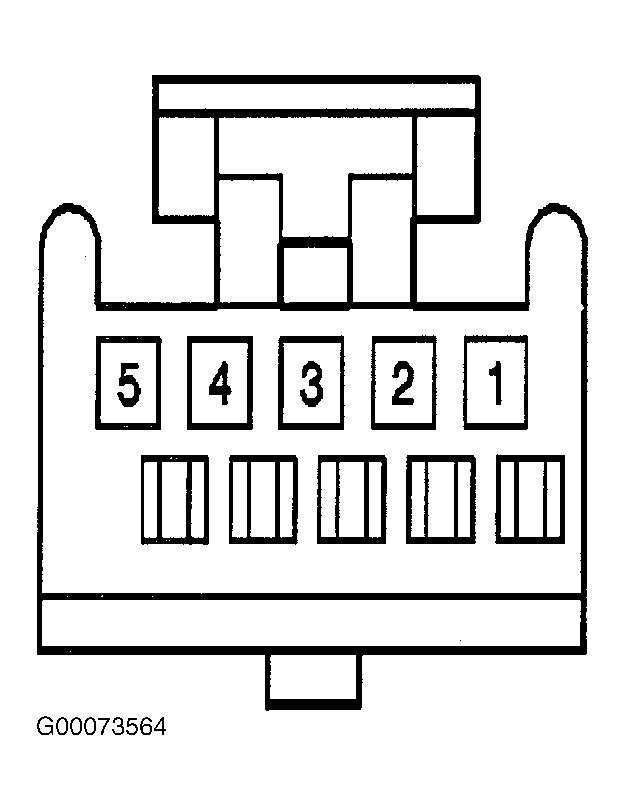 Courtesy of GENERAL MOTORS CORP.