Drive Cycle Mode 2
- 1)
Ensure Mode 1 has been successfully completed. Turn ignition off. Connect NGS scan tool to OBD-II DLC. Enter PID/DATA MONITOR menu selection. Access VSS PID.
- 2)
Ensure all accessories are off. Start engine and start to time Drive Cycle Mode 2 using stop watch. Drive vehicle at any legal speed for 3 minutes, no special pattern is necessary.
- 3)
After first 3 minutes, accelerate to 55 MPH (88 KM/H) with transmission in Drive (A/T) or 5th gear (M/T) and maintain that speed until 4 minutes from start of Mode 2 has elapsed. See Fig 1.
- 4)
At 4-minute mark, drive vehicle at 51-55 MPH (82-88 KM/H) until 5 minutes has elapsed from start of Mode 2.
- 5)
At 5-minute mark, slow vehicle to a stop and let engine idle in Park (A/T) or Neutral (M/T) for at least one minute. Turn ignition off. Mode 2 is completed.
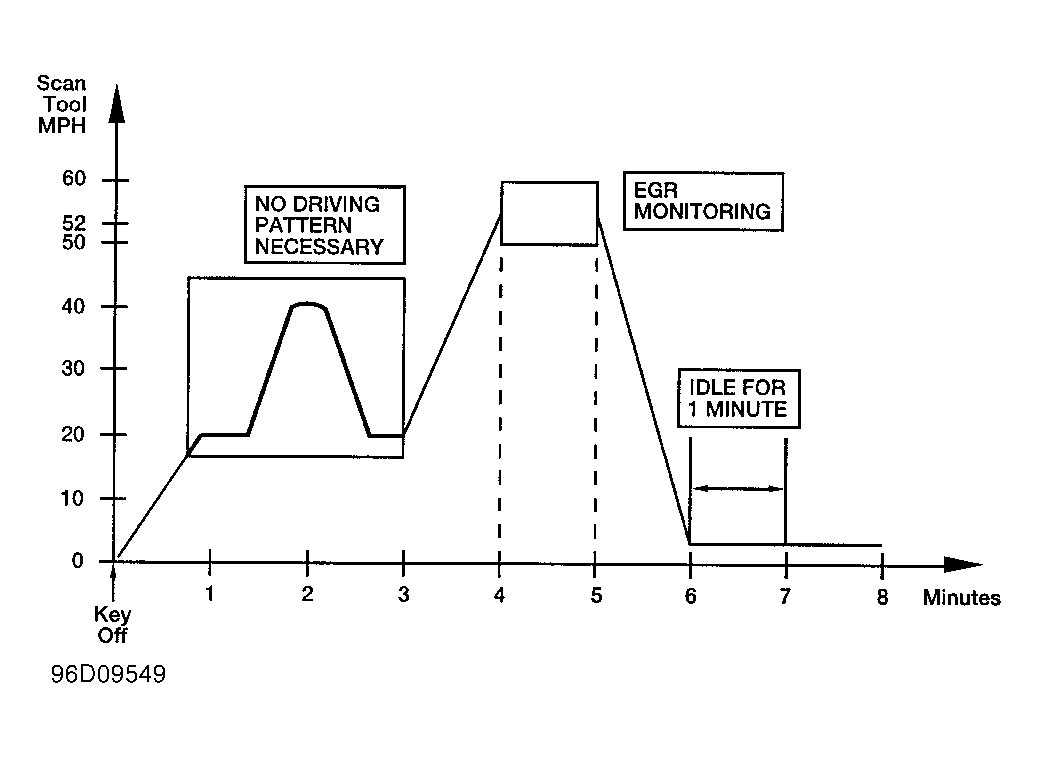 Courtesy of FORD MOTOR CO.