Inspection and Verification: Notes
- Verify the customer concern by inspecting the vehicle and observing the message center.
- Inspect to determine if one of the following mechanical or electrical concerns apply:
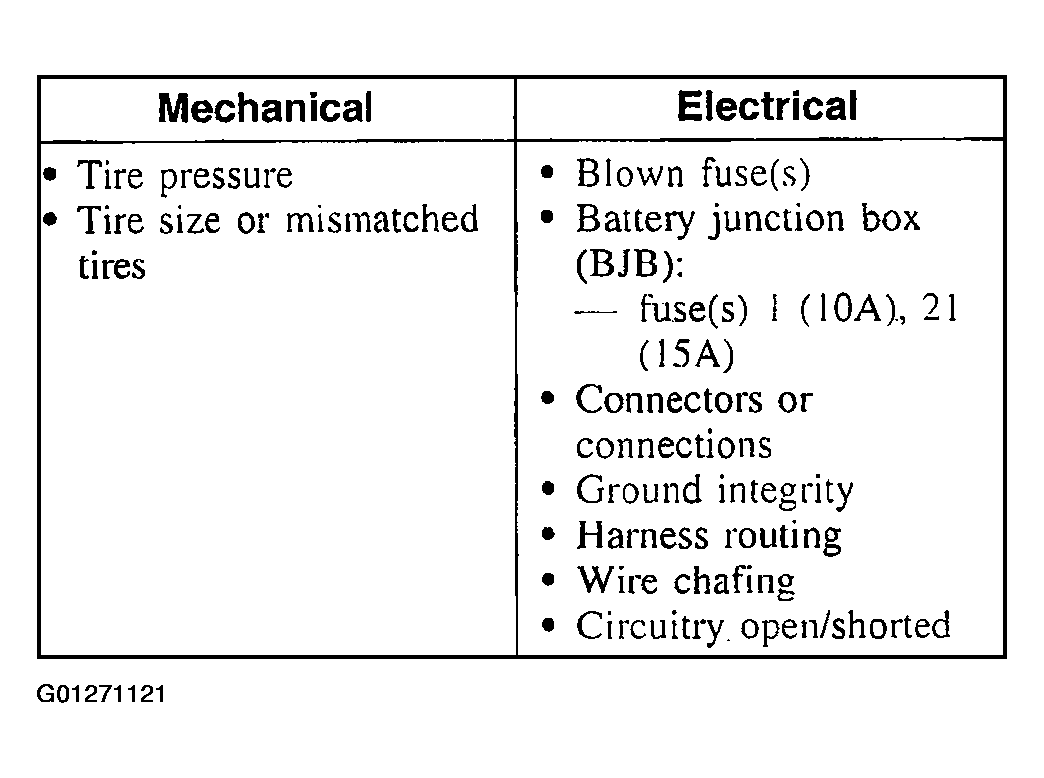 Courtesy of FORD MOTOR CO.
- If the inspection reveals an obvious concern(s) that can be readily identified, repair as required.
- If the concern remains after the inspection, connect the scan tool to the data link connector (DLC) located beneath the instrument panel and select the vehicle to be tested from the scan tool menu. If the scan tool does not communicate with the vehicle:
- check the connections to the vehicle.
- check the ignition switch position.
- verify that the battery voltage is between 10 and 17 volts. Refer to
BATTERY AND CHARGING SYSTEM
.
- If the scan tool still does not communicate with the vehicle, refer to the scan tool manual.
- Carry out the DATA LINK DIAGNOSTIC TEST. If the scan tool responds with:
- CKT914, CKT915 or CKT70 = ALL ECUS NO RESP/NOT EQUIP, refer to
MODULE COMMUNICATIONS NETWORK
.
- SYSTEM PASSED, retrieve and record the continuous diagnostic trouble codes (DTCs), erase the continuous DTCs, and carry out self-test diagnostics for the TPMS module.
- If the DTCs retrieved are related to the concern, refer to Tire Pressure Monitor Module Diagnostic Trouble Code (DTC) Index to continue diagnostics.
- If no DTCs related to the concern are retrieved, GO to Symptom Chart to continue diagnostics.