WARNING:
The safety belt pretensioner is a pyrotechnic device. Never probe a pretensioner electrical connector. Doing so could result in pretensioner or air bag deployment and could result in personal injury.
WARNING:
Never probe the connectors on the air bag module. Doing so can result in air bag deployment, which can result in personal injury.
WARNING:
To reduce the risk of personal injury, do not use any memory saver devices.
CAUTION:
If replacing only the front passenger seat cushion trim cover, the occupant classification sensor must be rezeroed.
NOTE:
If a seat equipped with a seat mounted side air bag and/or a safety belt pretensioner (if equipped) system is being serviced, the supplemental restraint system (SRS) must be disabled.
NOTE:
The air bag warning lamp illuminates when the RCM fuse is removed and the ignition switch is ON. This is normal operation and does not indicate a supplemental restraint system (SRS) fault.
NOTE:
Occupant classification sensor (OCS) system components (seat cushion foam pad, bladder with pressure sensor and electronic control unit) are calibrated to each other and are serviced as an assembly. The OCS system components are not to be installed separately. If a new OCS system, OCS system component or seat cushion foam pad are needed, a new OCS system service kit (seat cushion foam pad, bladder with pressure sensor and electronic control unit) must be installed as an assembly.
NOTE:
To identify between a production OCS system and a service OCS system (OCS service kit) inspect the ECU electrical connector. A production OCS system allows the disconnect of the ECU electrical connector. A service OCS system (OCS service kit) has the ECU electrical connector glued to the ECU, it cannot and should not be disconnected or altered.
NOTE:
The SRS must be fully operational and free of faults before releasing the vehicle to the customer.
NOTE:
Repair is made by installing a new part only. If the new part does not correct the condition, install the original part and perform the diagnostic procedure again.
NOTE:
When installing a new occupant classification sensor (OCS) service kit, refer to AIR BAG RESTRAINT SYSTEMS
for the OCS service kit installation procedure.
NOTE:
Power seat is shown, manual seat is similar.
- Remove the passenger seat and disable the SRS. For additional information, refer to DRIVER SEAT .
NOTE:
It is not necessary to remove the front seat when servicing the power seat switch.
When servicing only the power seat switch, disable the SRS. For additional information, refer to Supplemental Restraint System (SRS) Disabling and Activating in AIR BAG RESTRAINT SYSTEMS
2.
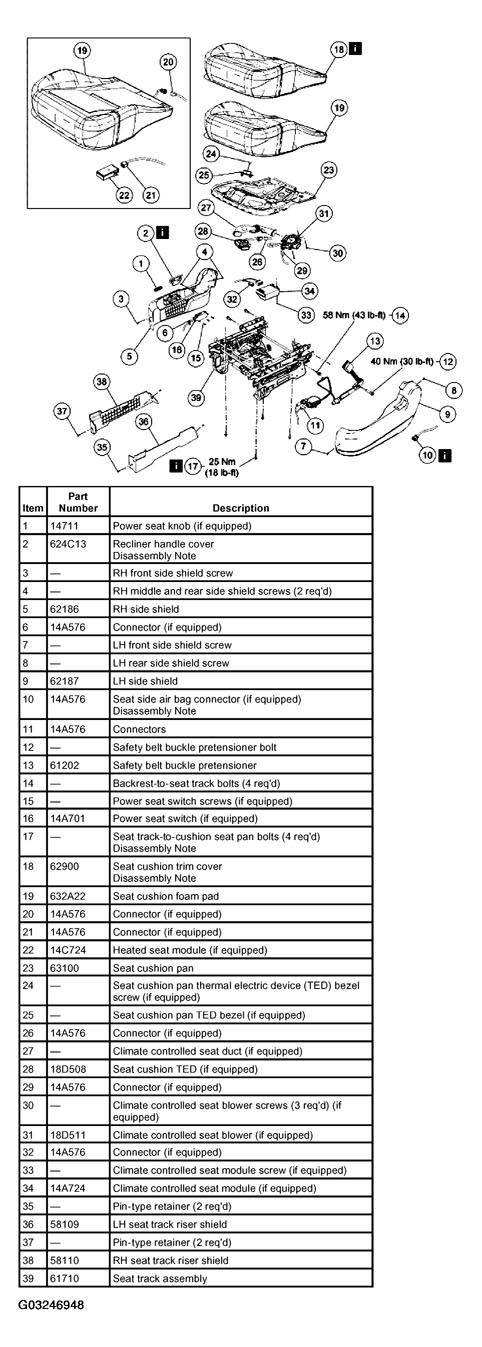 Courtesy of FORD MOTOR CO.
- Disassemble the parts in the order listed in the following illustration and table.
PARTS REMOVING SEQUENCE
| Part |
Steps |
| Front seat backrest |
2-14 |
| Front seat cushion trim cover |
2-14, 17-18 |
| Power seat switch |
1-6,15-16 |
| Climate controlled seat module |
32-34 |
| Heated seat module |
21-22 |
| Seat track, power seat motors |
2-14, 17,26,29,32-39 |
| Thermal electric device (TED) |
2-14, 17-19,24-28 |
| Climate controlled blower |
27, 29-31 |
- To assemble, reverse the disassembly procedure.
- Install the passenger seat and activate the SRS. Do not prove out the SRS at this time. For additional information, refer to DRIVER SEAT .
CAUTION:
There are three occupant classification sensor (OCS) system service kits available for this vehicle (base seat, heated seat and climate controlled seat). Always make sure the correct OCS service kit is installed.
CAUTION:
It is necessary to rezero the OCS system when a front passenger seat cushion is disassembled, a new trim cover installed, a seat side shield removed, or an OCS service kit is installed. A scan tool is used to trigger the active command to carry out rezeroing of the OCS system.
CAUTION:
Make sure the seat is completely assembled before rezeroing.
CAUTION:
The following precautions must be taken before rezeroing the OCS system:
NOTE:
The heated seat element on the front passenger seat cushion is not serviceable separately. If a new heated seat element is needed on the front passenger seat cushion a new occupant classification sensor (OCS) service kit, equipped with a heated seat element, must be installed.
NOTE:
When using a New Generation STAR (NGS) Tester you must use the appropriate memory card with the latest update to carry out this function. To rezero the OCS system:
NOTE:
To rezero the OCS system using the Worldwide Diagnostic System (WDS):
NOTE:
If the first attempt to rezero the OCS system is unsuccessful, a second attempt must be made.
-
- Make sure the OCS system components are connected and no faults are present.
- Make sure the OCS system is not at a temperature below 0°C (32°F) or above 45°C (113°F) when initiating the rezeroing process. If the vehicle has been exposed to extreme cold or hot temperatures, the vehicle must be exposed and kept at a temperature within the limits 0°C to 45°C (32°F to 113°F) for a minimum of 30 minutes.
- Make sure nothing is present on the passenger seat before rezeroing and nothing is placed on the seat during the rezeroing process.
- Make sure a minimum eight second time period has passed after cycling the ignition switch ON before the rezeroing process.
- select "SERVICE BAY FUNCTIONS"
- select "RCM"
- select "SYSTEM RESET"
- select the vehicle from the menu
- view the on-screen information, then press "TRIGGER"
The NGS screen will then display "OCS RESET: REZERO." Press "DONE" (button 8) to rezero the OCS system. The NGS will return to the vehicle menu once rezeroing of the OCS system is complete.
- select the "Toolbox" icon
- select "Body" from the menu
- select "Restraints" from the menu
- select "Seat Weight Sensor ReZero"
After selecting "Seat Weight Sensor ReZero", follow the on-screen prompts to carry out rezeroing of the OCS system.
Rezero the occupant classification sensor.
- With the front passenger seat empty, use a scan tool to trigger the active command and rezero the occupant classification sensor.
NOTE:
The ignition switch must be cycled after rezeroing the OCS system.
- Cycle the ignition switch from ON to OFF.
- Prove out the supplemental restraint system (SRS) as follows:
Turn the ignition key from ON to OFF. Wait 10 seconds, then turn the key back to ON and visually monitor the air bag indicator with the air bag modules installed. The air bag indicator will light continuously for approximately six seconds and then turn off. If an air bag supplemental restraint system (SRS) fault is present, the air bag indicator will either:
- fail to light.
- remain lit continuously.
- flash.
The flashing might not occur until approximately 30 seconds after the ignition switch has been turned from the OFF to the ON position. This is the time required for the restraints control module (RCM) to complete the testing of the SRS. If the air bag indicator is inoperative and a SRS fault exists, a chime will sound in a pattern of five sets of five beeps. If this occurs, the air bag indicator and any SRS fault discovered must be diagnosed and repaired.
Clear all continuous DTCs from the restraints control module using a scan tool.