Power Mirror System Inoperative
- Turn ignition switch to ON or ACCY position. Using a test light, probe power mirror switch connector terminal No. 8. See Fig 1
. If test light comes on, got to step 4). If test light does not come on, go to next step.
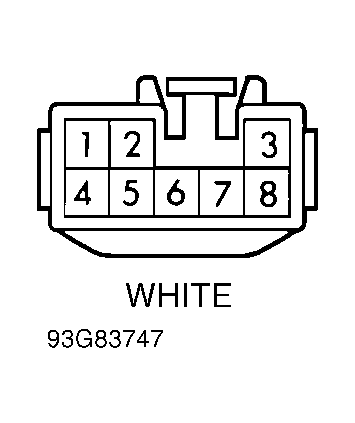 Courtesy of GENERAL MOTORS CORP.
- Using a voltmeter, backprobe audio alarm module connector No. 1 (located behind left kick panel) with positive lead. Ground remaining lead and. If voltage is greater than 10 volts, go to next step.If voltage is less than 10 volts, replace audio alarm module and retest system. If system remains inoperative, replace junction block No. 1.
- Check for open in Gray wire between audio alarm module and junction block No. 3. Also check for open in Gray wire between junction block No. 3 (located behind center of instrument panel) and power mirror switch. Repair wire as necessary. If wire is okay, replace junction block No. 3.
- Connect a test light to battery voltage and probe power mirror switch connector terminal No. 3 (White/Black wire). See Fig 1
. If test light does not come on, go to step 6). If test light comes on, turn ignition to LOCK position. Unplug left power mirror assembly connector. Unplug power mirror switch connector. Using a DVOM, check resistance between left mirror assembly connector terminal No. 2 (Blue wire; Brown/Red wire after splice) and power mirror switch connector terminal No. 7 (Brown/Red wire).
- If resistance is less than .5 ohm, replace power mirror switch. If resistance is greater than .5 ohm, check for open in Brown/Red wire between junction connector No. 3 and power mirror switch. Repair wire as necessary. If wire is okay, replace junction connector No. 3.
- Connect a test light to battery voltage and probe power junction block No. 3 connector C1 terminal No, 20 (White/Black wire). If test light does not come on, go to next step. If test light comes on, check for open in White/Black wire between power mirror switch and junction block No. 3. Repair wire as necessary. If wire is okay, replace junction block No. 3.
- Connect a test light to battery voltage and probe power junction connector No. 3 terminal No. 14 (White/Black wire). See Fig 2
. If test light comes on, go to next step. If test light does not come on, check for open in White/Black wire between junction connector No. 1 and junction connector No. 3. Also, check for open in White/Black wire between junction connector No. 1 and ground connection G200 (located behind left kick panel). See Fig 2
. Repair wire as necessary. If wire is okay, replace junction connector No. 1.
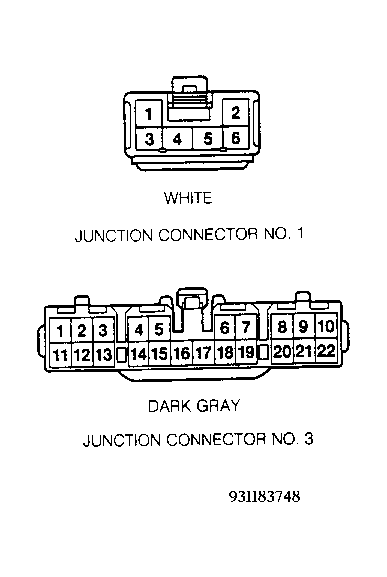 Courtesy of GENERAL MOTORS CORP.
- Check for open in White/Black wire between junction block No. 3 and junction connector No. 3. Repair wire as necessary. If wire is okay, replace junction connector No. 3.