Gear Position Indicator Input Test
- Remove instrument cluster from dash panel. Disconnect gear position indicator 14-pin connector. See Fig 1
. Check for bent, loose or corroded terminals, and repair as necessary. Turn ignition on. Using DVOM, check for voltage between terminal No. 14 (Light Green wire) and ground. If reading is about 5 volts, go to next step. If reading is not about 5 volts, check for open in Light Green wire.
- Using DVOM, check for continuity between terminal No. 8 (Black wire) and ground. If continuity exists, go to next step. If continuity does not exist, check for open in Black wire. Check for poor ground connection G401. Repair as necessary.
- Turn ignition on. Using DVOM, check voltage between terminal No. 1 (Yellow wire) and ground. If battery voltage exists, go to next step. If battery voltage does not exist, check for blown fuse No. 25 (7.5-amp) in underdash fuse/relay box. Check for open in Yellow wire. Repair or replace as necessary.
- Turn ignition on. Turn combination light switch on, and dimmer switch to maximum brightness. Using DVOM connected to ground, check for voltage at terminal No. 2 (Red/Black wire) and terminal No. 3 (Red wire). If battery voltage exists, go to next step. If battery voltage does not exist, check for open fuse No. 47 (7.5-amp) in underhood fuse/relay center. Check for faulty dash lights brightness controller. See DASH LIGHTS BRIGHTNESS CONTROLLER. Open in Red/Black or Red wire. Check for faulty combination light switch. See STEERING COLUMN SWITCHES
article. Repair as necessary.
- Connect DVOM between terminal No. 7 (Green/Black wire) and ground. Place shift lever in any position other than "D4/D3". Turn ignition on. Check battery voltage reading for about 2 seconds after ignition is turned on, and drop to less than 1 volt. If readings are as specified, go to next step. If readings are not as specified, check for open in Green/Black wire or faulty Powertrain Control Module (PCM). See G - TEST W/CODES
article in the ENGINE PERFORMANCE section.
- Using DVOM, check for continuity between indicated wire and ground with shift lever in specified position. See GEAR POSITION INDICATOR INPUT TEST table. If continuity is as specified, system is operating properly. Replace printed circuit board. If continuity is not as specified, check for faulty gear position switch, an open in appropriate wire or poor ground connections. Repair as necessary.
GEAR POSITION INDICATOR INPUT TEST
| Shift Lever Position |
Terminal No. (Wire Color) |
| "P" Park |
5 (Black/Blue) |
| "R" Reverse |
12 (White) |
| "N" Neutral |
11 (Red) |
| "D4" |
7 (Yellow) |
| "3" |
10 (Green) |
| "2" |
11 (Blue) |
| "1" |
9 (Brown) |
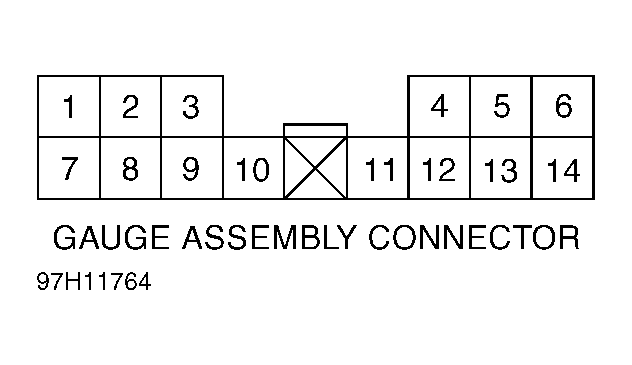 Courtesy of AMERICAN HONDA MOTOR CO., INC.