With navigation
- Make sure you have the anti-theft codes for the audio and navigation system.
- Remove the center panel (see DASHBOARD CENTER PANEL REMOVAL/INSTALLATION
).
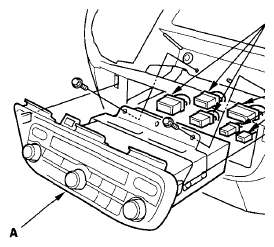
- Remove the bolts, then pull out the audio unit (A).
 Courtesy of AMERICAN HONDA MOTOR CO., INC.
- Disconnect the connectors (B), then remove the audio unit.
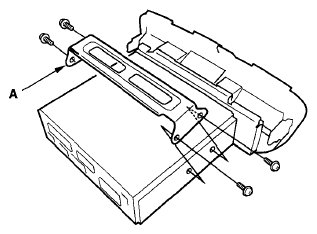
- Remove the bolts, and the bracket (A).
 Courtesy of AMERICAN HONDA MOTOR CO., INC.
- Install the audio unit in the reverse order of removal, and note these items:
- Make sure all connectors and AM/FM antenna sublead are secure.
- Enter the anti-theft codes for the audio system, and set the clock.
- If necessary, enter the navigation system code.