VSA OFF Switch Test
- Turn the ignition switch to LOCK (0).
- Open the driver's dashboard lower cover (see DRIVER'S DASHBOARD LOWER COVER REMOVAL/INSTALLATION
).
- Push out the VSA OFF switch (A) from the driver's dashboard lower cover.
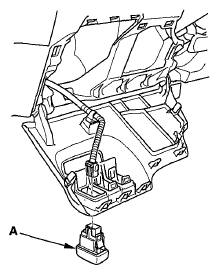 Courtesy of AMERICAN HONDA MOTOR CO., INC.
- Check for continuity between the VSA OFF switch 5P connector terminal in each switch position according to the table.
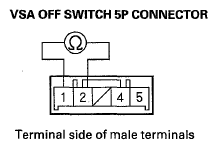 Courtesy of AMERICAN HONDA MOTOR CO., INC.
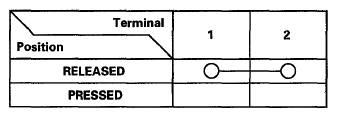 Courtesy of AMERICAN HONDA MOTOR CO., INC.
- Check for continuity between VSA OFF switch 5P connector terminals No. 4 and No. 5. There should be continuity at all times.
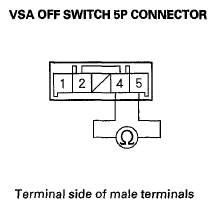 Courtesy of AMERICAN HONDA MOTOR CO., INC.
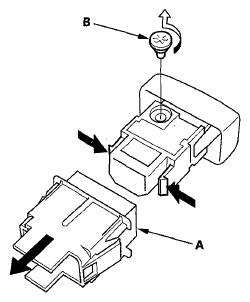
- If the continuity is not as specified, remove the cover (A), and replace the bulb (B).
 Courtesy of AMERICAN HONDA MOTOR CO., INC.
- Install the VSA OFF switch in the reverse order of removal.