D3 Switch Test
- Remove the shift lever assembly (see SHIFT LEVER REMOVAL
).
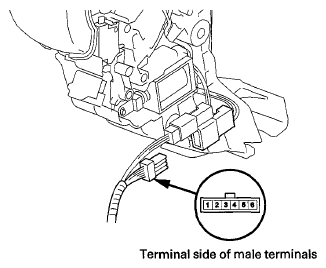
- Disconnect A/T gear position indicator panel light harness/park pin switch/D3 switch connector.
 Courtesy of AMERICAN HONDA MOTOR CO., INC.
- Push and release the D3 switch several times, and check the switch for continuity between A/T gear position indicator panel light harness/park pin switch / D3 switch connector terminals No. 5 and No. 6. The continuity should toggle between continuity and no continuity between the terminals every time the D3 switch is pushed and released.
- D3 switch test is finished if the test result is OK. If the D3 switch works incorrectly at A/T gear position indicator panel light harness / park pin switch / D3 switch connector, test the D3 switch at the D3 switch 2P connector.
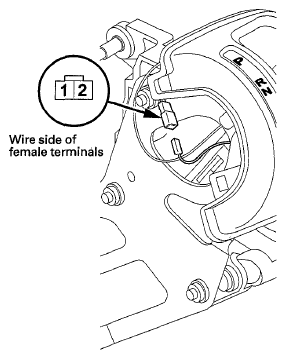
- Disconnect the D3 switch 2P connector from the connector holder, and disconnect it.
 Courtesy of AMERICAN HONDA MOTOR CO., INC.
- Push and release the D3 switch several times, and check the switch for continuity between D3 switch 2P connector terminals No. 1 and No. 2. There should be continuity and no continuity between terminals every time the D3 switch is pushed and released.
- Replace the D3 switch if the switch tests bad.
- Replace the D3 switch connector harness, the A/T gear position indicator panel light harness, and the park pin switch (see A/T GEAR POSITION INDICATOR PANEL LIGHT HARNESS REPLACEMENT
) as a set if the switch is OK. The D3 switch connector harness is not available from the A/T gear position indicator panel light harness and park pin switch.
- Connect the 2P connector.
- Install the shift lever assembly (see SHIFT LEVER INSTALLATION
).