Clear/Learn Procedure (with the HDS)
- Connect the HDS to the data link connector (DLC) (A) located under the driver's side of the dashboard.
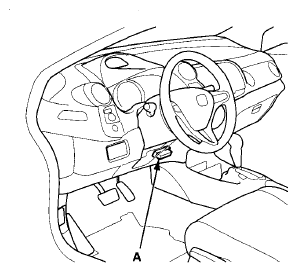 Courtesy of AMERICAN HONDA MOTOR CO., INC.
- Turn the ignition switch to ON (II).
- Make sure the HDS communicates with the PCM and other vehicle systems. If it doesn't, go to the DLC circuit troubleshooting (see
DLC CIRCUIT TROUBLESHOOTING
).
- Select CRANK PATTERN in the ADJUSTMENT MENU with the HDS.
- Select CRANK PATTERN LEARNING with the HDS, and follow the screen prompts.