Cable Reel Replacement: Removal
- Make sure the front wheels are aligned straight ahead.
- Do the 12 volt battery terminal disconnection procedure (see
USING THE GR8 BATTERY DIAGNOSTIC STATION
), then wait at least 3 minutes before starting work.
- Remove the driver's airbag (see DRIVER'S AIRBAG REPLACEMENT ).
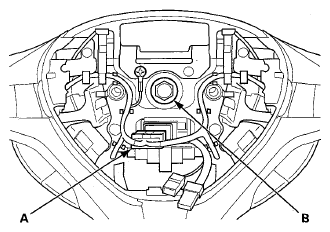
- Disconnect the cable reel subharness 20P connector (A) from the cable reel, then remove the steering wheel bolt (B).
 Courtesy of AMERICAN HONDA MOTOR CO., INC.
- Confirm that the front wheels point straight ahead, then remove the steering wheel with a steering wheel puller (see step 5 STEERING WHEEL REMOVAL
).
Do not tap on the steering wheel or steering column shaft when removing the steering wheel.
- Remove the upper and lower column covers (see
COLUMN COVER REMOVAL/INSTALLATION
).
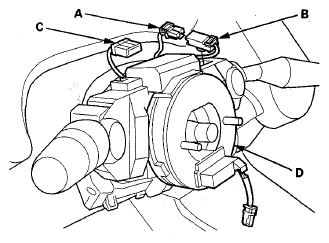
- Disconnect the dashboard wire harness 4P connector (A) from the cable reel 4P connector (B), then disconnect the dashboard wire harness 20P connector (C) from the cable reel (D).
 Courtesy of AMERICAN HONDA MOTOR CO., INC.
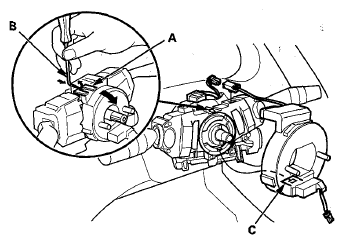
- Release the lock tab (A) under the cable reel connector with a 90° hook shaped tool (B). Slide the tool below the cable reel connector just above the lock tab. Release the lower lock tab (C), and slide the cable reel off the column.
 Courtesy of AMERICAN HONDA MOTOR CO., INC.