CVT Driven Pulley Pressure Control Solenoid Valve Replacement
- Remove the lower valve body (see LOWER VALVE BODY REMOVAL/INSTALLATION ).
- Remove the inhibitor solenoid (see INHIBITOR SOLENOID REMOVAL/INSTALLATION ).
- Disconnect the CVT driven pulley pressure control solenoid valve 2P connector (A) and the CVTF temperature sensor (B).
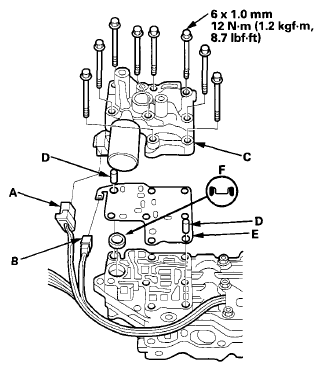 Courtesy of AMERICAN HONDA MOTOR CO., INC.
- Remove the CVT driven pulley pressure control solenoid valve (C), the dowel pins (D), and the separator plate (E).
- Check that the filter (F) is in good condition, replace it if it is clogged or damaged.
- If the filter was removed, install the filter in the lower valve body.
- Install the dowel pins and the separator plate on the lower valve body.
- Install a new CVT driven pulley pressure control solenoid valve.
- Check the connector for corrosion or dirt, and clean or repair if necessary.
- Connect the CVT driven pulley pressure control solenoid valve 2P connector and the CVTF temperature sensor.
- Install the inhibitor solenoid (see INHIBITOR SOLENOID REMOVAL/INSTALLATION ).
- Install the lower valve body (see LOWER VALVE BODY REMOVAL/INSTALLATION ).