| (1) Duplicate issue |
- Audio output on other mode (CD, Media)
- If same issue occurs in different mode, check sound (Refer to
'Sound trouble shooting guide')
- Radio continues to play last played channel (frequency) before turning IGN off
- If last played channel is changed, check battery drain B/U voltage shutdown
→ Last played channel may change
- Radio channel (Frequency) issue when using Seek/Stop button?
- Part defect if Seek/Stop button fails to receive signal in a good reception environment (Antenna, H/U, feeder cable, etc.)
|
(2) External/Environmental
Issue
- Poor reception area
- Black box
- Cable connection
|
- Move to better reception environment (Poor reception area)
- If this issue continues, proceed with step 2 below
Information
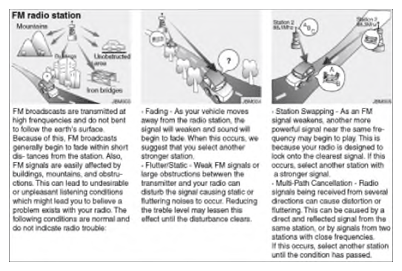
- Bad reception by circumstances
- Black box (vehicle modification noise)
- Remove power on black box (Especially rear) and re-test
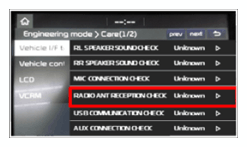
- Engineering mode > Care > Vehicle I/F Test/Radio (Confirm reception using different vehicles)
- Check reception on good reception environment: Normal if above 30db
  Courtesy of KIA MOTORS AMERICA, INC.KIA MOTORS AMERICA, INC. Courtesy of KIA MOTORS AMERICA, INC.KIA MOTORS AMERICA, INC.
Courtesy of KIA MOTORS AMERICA, INC.KIA MOTORS AMERICA, INC.
|
(2) External/Environmental
Issue
- Poor reception area
- Black box
- Cable connection
|
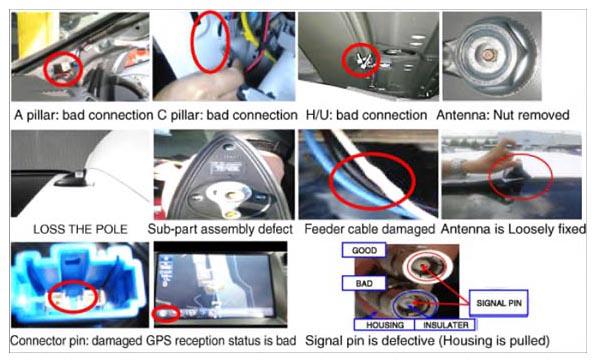
4. Check antenna cable and connection if the value for step 3 is below 30db
- Check antenna location and type
Information
- Examples of defect of antenna and cable
 Courtesy of KIA MOTORS AMERICA, INC. Courtesy of KIA MOTORS AMERICA, INC.
|
| (3) Defect caused by Ext. parts |
- If antenna connection is good, replace antenna and feeder cable and re-test (Use certified antenna)
|
| (4) Check H/U defect |
- If this issue continues, replace H/U and re-test
|