DTC Check / Clear
- CHECK DTC
- Connect the intelligent tester (with CAN VIM) to the DLC3.
- Turn the engine switch on (IG) and turn the intelligent tester on.
- Enter the following menus: DIAGNOSTICS / OBD/ MOBD / METER / DTC INFO / CURRENT CODES.
- Check for DTCs.
- CLEAR DTC
- Connect the intelligent tester (with CAN VIM) to the DLC3.
- Turn the engine switch on (IG) and turn the intelligent tester on.
- Enter the following menus: DIAGNOSTICS / OBD/ MOBD / METER / DTC INFO / CURRENT CODES.
- Erase DTCs by pressing the YES button on the tester.
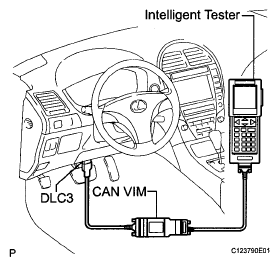 Courtesy of © TOYOTA, LICENSE AGREEMENT TMS1002