Navigation Ecu: Installation
- INSTALL NAVIGATION ECU
- Install the navigation ECU with the 4 bolts.
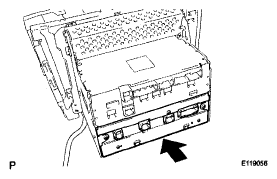 Courtesy of © TOYOTA, LICENSE AGREEMENT TMS1002
- Connect the connectors.
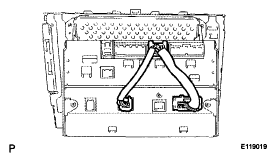 Courtesy of © TOYOTA, LICENSE AGREEMENT TMS1002
- INSTALL MULTI-DISPLAY ASSEMBLY
- INSTALL NO. 2 RADIO BRACKET
(See
INSTALLATION
)
- INSTALL NO. 1 RADIO BRACKET
(See
INSTALLATION
)
- INSTALL MULTI-DISPLAY WITH RADIO RECEIVER ASSEMBLY
(See
INSTALLATION
)
- INSTALL CENTER LOWER INSTRUMENT CLUSTER FINISH PANEL
(See
INSTALLATION
)
- INSTALL NO. 3 INSTRUMENT PANEL REGISTER ASSEMBLY
(See
INSTALLATION
)
- INSTALL CONSOLE BOX
(See
INSTALLATION
)
- INSTALL CONSOLE BOX REGISTER ASSEMBLY
(See
INSTALLATION
)
- INSTALL FRONT ASH RECEPTACLE SUB-ASSEMBLY
(See
INSTALLATION
)
- INSTALL FRONT CONSOLE PANEL SUB-ASSEMBLY (for Manual Transmission)
(See
INSTALLATION
)
- INSTALL REAR CONSOLE PANEL SUB-ASSEMBLY (for Manual Transmission)
(See
INSTALLATION
)
- INSTALL CONSOLE PANEL SUB-ASSEMBLY (for Automatic Transmission)
(See
INSTALLATION
)
- INSTALL UPPER NO. 2 CONSOLE PANEL GARNISH (for Automatic Transmission)
(See
INSTALLATION
)
- INSTALL UPPER NO. 1 CONSOLE PANEL GARNISH (for Automatic Transmission)
(See
INSTALLATION
)
- INSTALL SHIFT LEVER KNOB SUB-ASSEMBLY (for Manual Transmission)
- INSTALL SHIFT LEVER KNOB SUB-ASSEMBLY (for Automatic Transmission)
- INSERT MAP DISC
- Remove the clock assembly
- Turn the engine switch on (ACC).
- Insert the map disc.
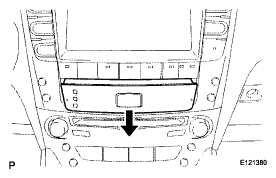 Courtesy of © TOYOTA, LICENSE AGREEMENT TMS1002
- Check that the wire harness is in the position shown in the illustration.
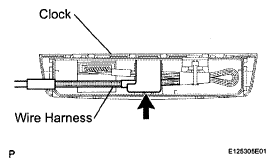 Courtesy of © TOYOTA, LICENSE AGREEMENT TMS1002
- Install the clock assembly.
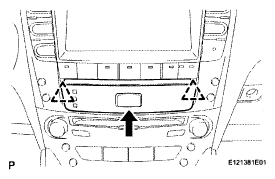 Courtesy of © TOYOTA, LICENSE AGREEMENT TMS1002
- ADJUST CLOCK