Display And Navigation Assembly: Removal
- REMOVE LUGGAGE COMPARTMENT MAT SUB-ASSEMBLY
(See
REMOVAL
)
- REMOVE BATTERY SERVICE HOLE COVER LH
(See
REMOVAL
)
- DISCONNECT CABLE FROM NEGATIVE BATTERY TERMINAL
NOTE:
- After the power switch is turned OFF, the HDD navigation system requires approximately 6 minutes to record various types of memory and settings. As a result, after turning the power switch OFF, wait 6 minutes or more before disconnecting the cable from the negative (-) battery terminal.
- When disconnecting the cable some systems need to be initialized after the cable is reconnected (see
INITIALIZATION
).
- REMOVE INSTRUMENT PANEL FINISH PANEL END LH
(See
REMOVAL
)
- REMOVE INSTRUMENT PANEL FINISH PANEL END RH
(See
REMOVAL
)
- REMOVE SHIFT LEVER KNOB SUB-ASSEMBLY
(See
REMOVAL
)
- REMOVE NO. 3 BOX PANEL
(See
REMOVAL
)
- REMOVE REAR UPPER CONSOLE PANEL
(See
REMOVAL
)
- REMOVE UPPER CONSOLE PANEL SUB-ASSEMBLY
(See
REMOVAL
)
- REMOVE RADIO RECEIVER ASSEMBLY WITH BRACKET
(See
REMOVAL
)
- REMOVE DISPLAY AND NAVIGATION ASSEMBLY WITH BRACKET
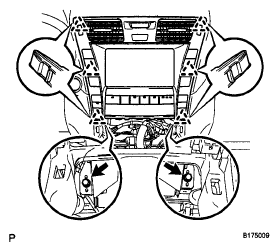
- Remove the 2 bolts
 Courtesy of © TOYOTA, LICENSE AGREEMENT TMS1002
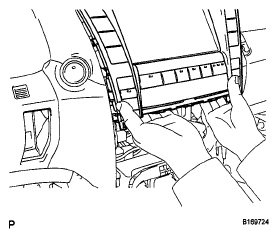
- With both hands, pull the bottom part of the display outward slightly.
 Courtesy of © TOYOTA, LICENSE AGREEMENT TMS1002
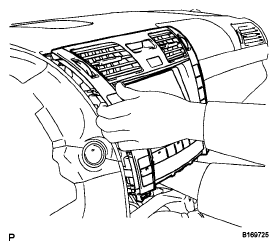
- With your right hand holding the rear side of the display and your left hand holding the left side of the display, pull it outward slightly.
 Courtesy of © TOYOTA, LICENSE AGREEMENT TMS1002
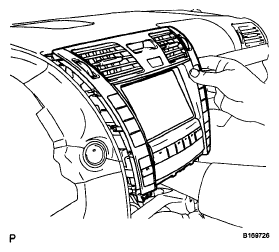
- With your left hand holding the rear side of the display and your right hand holding the right side of the display, pull it outward slightly.
 Courtesy of © TOYOTA, LICENSE AGREEMENT TMS1002
- Repeat the 2 steps above several times to detach the 6 clips and pull out the display.
- Disconnect the connectors and remove the display.
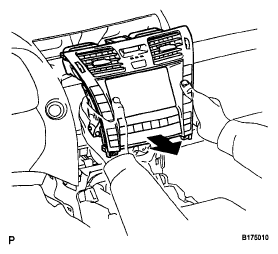 Courtesy of © TOYOTA, LICENSE AGREEMENT TMS1002
- REMOVE NO. 2 RADIO BRACKET
- Remove the 2 bolts and bracket
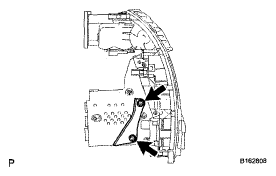 Courtesy of © TOYOTA, LICENSE AGREEMENT TMS1002
- REMOVE NO. 1 RADIO BRACKET
- Remove the 2 bolts and bracket.