Floor Shift Assembly: Disassembly
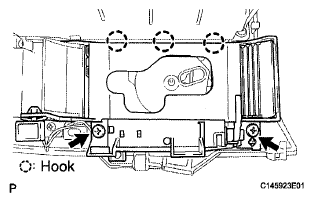
- REMOVE SHIFT POSITION INDICATOR
- Remove the 2 screws and detach the 3 hooks. Then remove the shift position indicator from the rear console upper panel.
 Courtesy of © TOYOTA, LICENSE AGREEMENT TMS1002
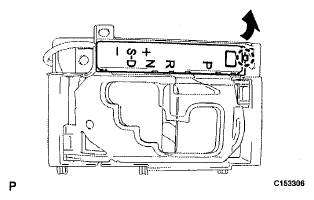
- REMOVE CONTROL POSITION INDICATOR PLATE
- Using a small screwdriver, detach the claw and remove the indicator plate.
 Courtesy of © TOYOTA, LICENSE AGREEMENT TMS1002
- REMOVE SHIFT LEVER CAP
- Detach the 2 claws and remove the shift lever cap.
 Courtesy of © TOYOTA, LICENSE AGREEMENT TMS1002
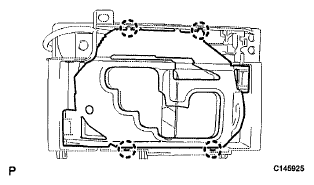
- REMOVE POSITION INDICATOR LENS
- Using a small screwdriver, detach the 4 claws and remove the lens from the shift position indicator.
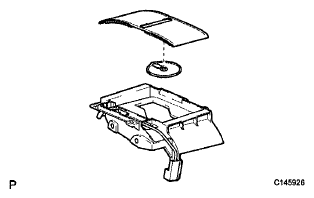
- REMOVE POSITION INDICATOR SLIDE COVER
- Remove the position indicator slide cover from the shift position indicator.
- Remove the No. 2 slide cover from the slide cover.
 Courtesy of © TOYOTA, LICENSE AGREEMENT TMS1002
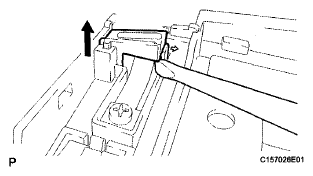
- REMOVE SHIFT LOCK RELEASE BUTTON
- Using a small screwdriver, detach the claw and remove the button.
 Courtesy of © TOYOTA, LICENSE AGREEMENT TMS1002
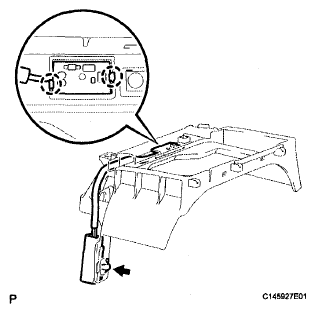
- REMOVE INDICATOR LIGHT WIRE SUB-ASSEMBLY
- Disconnect the connector clamp.
- Using a small screwdriver, detach the 2 claws and remove the wire.
 Courtesy of © TOYOTA, LICENSE AGREEMENT TMS1002