Test No. 1
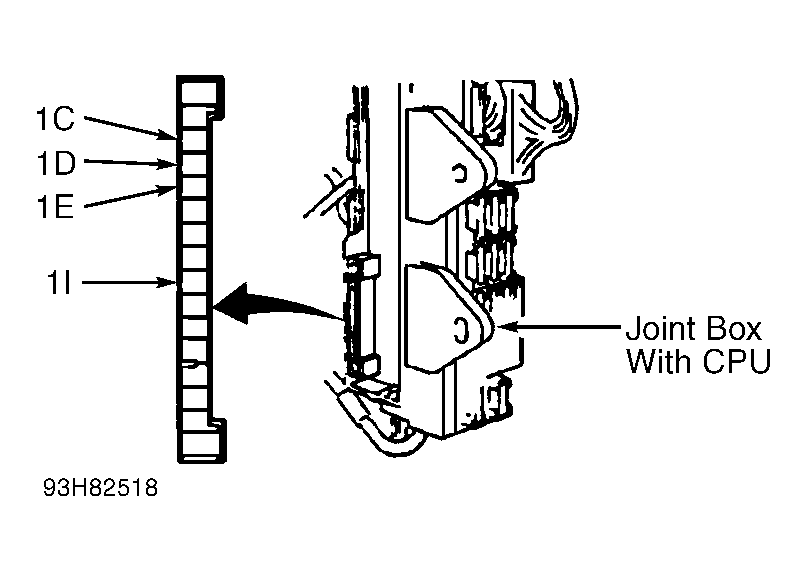
- Check ROOM fuse. If fuse is faulty, replace fuse (repair circuit if shorted). If fuse is okay, remove key from ignition switch. Measure voltage at terminal 1C of CPU 16-pin connector. SeeFig 1
.
- If battery voltage is not present, repair wiring between ROOM fuse and CPU. If battery voltage is present, check continuity between ground and terminal 1D of CPU 16-pin connector. If there is no continuity, repair wiring between CPU and ground.
- If there is continuity, remove key from ignition switch. Measure voltage at terminal 1I of CPU 16-pin connector. If battery voltage is present, replace key reminder switch or repair wiring between ROOM fuse and CPU.
- If battery voltage is not present, check continuity between ground and terminal 1E of CPU 16-pin connector with door open, then closed (do this at each door). Continuity should exist with door open. Continuity should not exist with door closed. If continuity is as specified, go to step 6).
- If continuity is not as specified, remove suspect door switch. Check continuity of switch with switch button released. If there is continuity, repair wiring between CPU and suspect door switch. If there is no continuity, replace door switch.
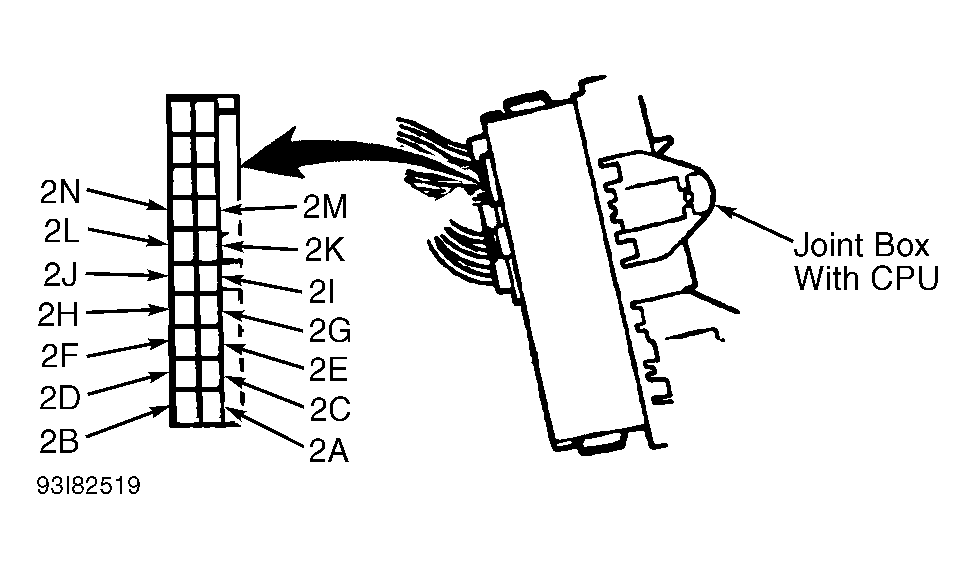
- Disconnect CPU 20-pin connector. SeeFig 2
. Close trunk and hood. Check continuity between ground and terminal 2J of CPU 20-pin connector. If there is no continuity, go to step 8).
- If there is continuity, check continuity between ground and terminal 2N of CPU 20-pin connector. If there is no continuity, go to step 9). If there is continuity, check for poor connection at CPU 20-pin connector. If connector is okay, go to step 10).
- Disconnect trunk switch connector (if necessary, remove trim panel and trunk latch for access). Check continuity between switch connector terminals. With switch lever pushed (trunk closed), there should be no continuity. With switch lever released (trunk open), there should be continuity. If continuity is not as specified, replace switch. If continuity is as specified, repair wiring between CPU and trunk switch.
- Disconnect hood switch connector. Check continuity between hood switch connector terminals. With switch lever pushed (hood closed), there should be no continuity. With switch lever released (hood open), there should be continuity. If continuity is not as specified, replace hood switch. If continuity is as specified, repair wiring between CPU and hood switch.
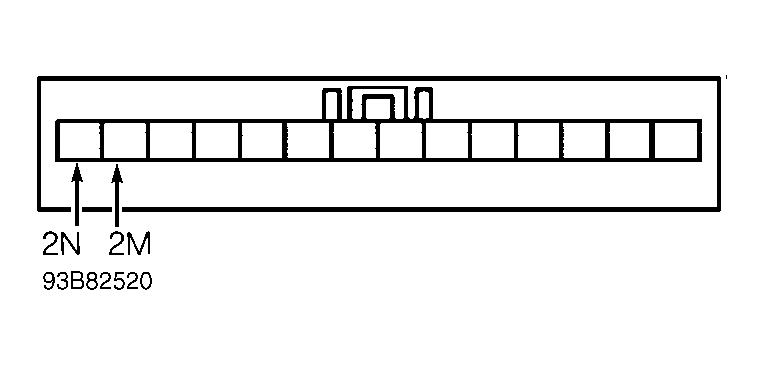
- Disconnect CPU 20-pin connector. Ground terminal 2D (Blue/Green wire) of CPU 20-pin connector. If security light comes on, replace CPU. If security light does not come on, check voltage at terminal 2N (Blue/Green wire) of 14-pin instrument cluster connector. SeeFig 3
. If battery voltage is not present, repair wiring between ROOM fuse and instrument cluster.
- If battery voltage is present, check voltage at terminal 2M (Blue/Red wire) of 14-pin instrument cluster connector. If battery voltage is present, repair wiring between instrument cluster and CPU. If battery voltage is not present, replace security light bulb.
 Courtesy of MAZDA MOTORS CORP.
 Courtesy of MAZDA MOTORS CORP.
 Courtesy of MAZDA MOTORS CORP.