Using ABS Warning Light
- Turn ignition off. If ignition is on before connecting test equipment, diagnostic test mode will not start. Connect a jumper wire between TBS terminal and GND terminal of Data Link Connector (DLC). See Figure
. Turn ignition on.
- ABS warning light will illuminate for 3 seconds then flash codes. Note any codes that are displayed. See Fig 1
. See DIAGNOSTIC TROUBLE CODE DESCRIPTION
. Perform appropriate test. See DIAGNOSTIC TROUBLE CODE (DTC) TESTING
. Clear codes after servicing. See CLEARING CODES
.
DIAGNOSTIC TROUBLE CODE DESCRIPTION
| DTC |
Probable Cause |
| 05 |
Stoplight Switch Wiring Harness |
| 11 |
Right Front Wheel Speed Sensor/Sensor Rotor |
| 12 |
Left Front Wheel Speed Sensor/Sensor Rotor |
| 13 |
Right Rear Wheel Speed Sensor/Sensor Rotor |
| 14 |
Left Rear Wheel Speed Sensor/Sensor Rotor |
| 15 |
Wheel Speed Sensor/Sensor Rotor |
| 22 |
Right Front Solenoid Valve (AV) |
| 23 |
Right Front Solenoid Valve (EV) |
| 24 |
Left Front Solenoid Valve (AV) |
| 25 |
Left Front Solenoid Valve (EV) |
| 26 |
Rear Solenoid Valve (AV) |
| 27 |
Rear Solenoid Valve (EV) |
| 51 |
Valve Relay |
| 53 |
Motor Relay/Pump Motor |
| 61 |
ABS Control Module |
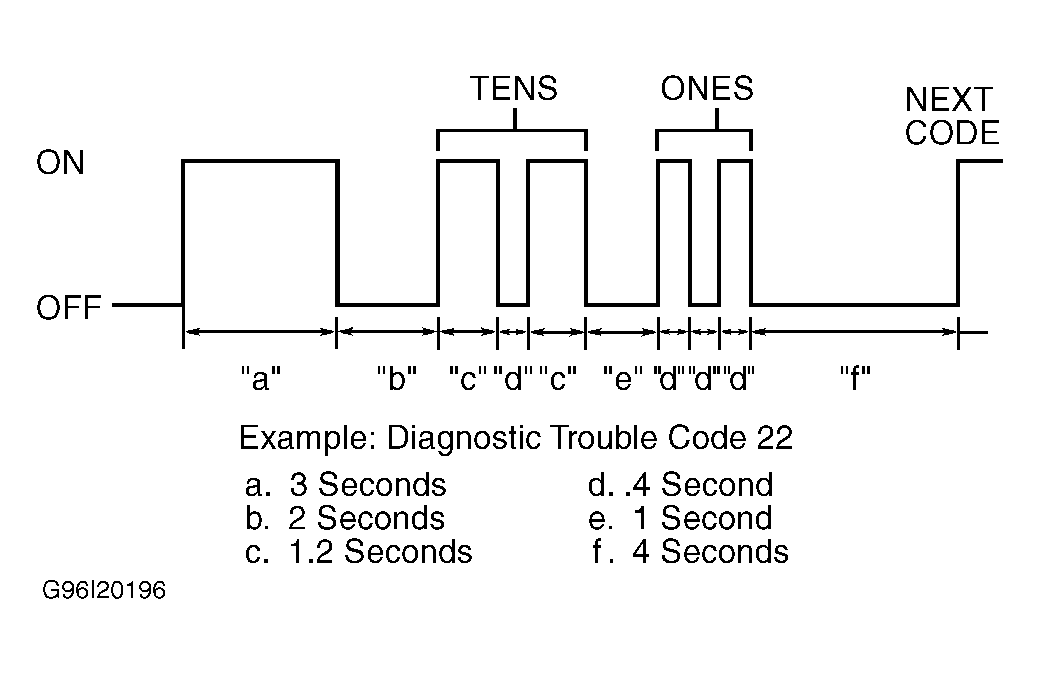 Courtesy of MAZDA MOTORS CORP.