Using M-MDS
- Fully lower the driver-side door glass.
- Connect the M-MDS to the DLC-2.
- Pull out the M-MDS cable from the door glass opening and set the M-MDS outside the vehicle.
CAUTION:
- Protect the cable and body contact area with a clean rag, otherwise they could be damaged.
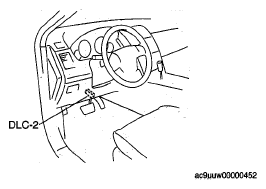 Courtesy of MAZDA MOTORS CORP.
- After the vehicle is identified, select the following items from the initial screen of the M-MDS.
- When using the IDS (laptop PC)
- Select the "Toolbox" tab.
- Select "Body".
- Select "Security".
- When using the PDS (Pocket PC)
- Select "Programming".
- Then, select items from the screen menu in the following order.
- Select "PATS Functions".
- Select "Program Additional card key".
- Security access begins and the M-MDS displays the "OUT-CODE".
NOTE:
- When "OUT-CODE" is first displayed, turning the ignition switch from the LOCK to the ON position 5 times
will change the "OUT-CODE".
- Input the "IN-CODE" that corresponds to the "OUT-CODE " displayed on the M-MDS screen.
NOTE:
- After Step 7 is completed and the card key programming is activated, the door lock actuator operates to lock, and then operates to unlock.
- Press the unprogrammed card key UNLOCK button twice.
NOTE:
- After Step 8 is completed and the card key is programmed, the door lock actuator operates to lock, and then operates to unlock.
- If programming more card keys, remove the supplementary key once, and then repeat the procedure by following the instructions on the M-MDS screen.