Clutch Pedal Position (CPP) Switch Inspection
- Verify that the CPP switch is installed properly.
- Remove the battery cover. (See
BATTERY REMOVAL/INSTALLATION [L3 WITH TC]
.)
- Disconnect the negative battery cable.
- Disconnect the CPP switch connector. (See
CLUTCH PEDAL REMOVAL/INSTALLATION
.)
- Inspect for continuity between the CPP switch terminals using an ohmmeter.
CONTINUITY CHART
| Specification |
| Measured condition |
Clutch pedal position |
Continuity |
| Rod pushed |
Clutch pedal released |
Continuity detected |
| Except above |
Clutch pedal depressed |
No continuity |
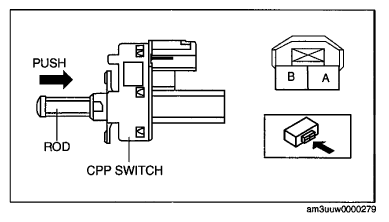 Courtesy of MAZDA MOTORS CORP.