When using M-MDS
- Connect the M-MDS to the DLC-2.
- After the vehicle is identified, select the following items from the initialization screen of the M-MDS.
- Select "Data logger"
- Select "Module"
- Select "IC"
- Using the simulation function item LCD_SEG, verify that the warning/indicator lights are displayed as shown in the following figure.
- If the warning/indicator lights are not displayed as shown in the figure, replace the indicator unit. (Refer to INDICATOR UNIT REMOVAL/INSTALLATION .)
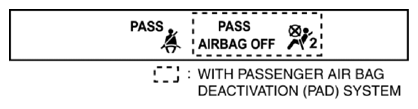 Courtesy of MAZDA MOTORS CORP.