Refrigerant Pressure Sensor Removal/Installation: Notes
- Disconnect the negative battery terminal. (Refer to NEGATIVE BATTERY TERMINAL DISCONNECTION/CONNECTION
.)
- Discharge the refrigerant. (Refer to REFRIGERANT RECOVERY
.) (Refer to REFRIGERANT CHARGING
.)
- Disconnect the connectors.
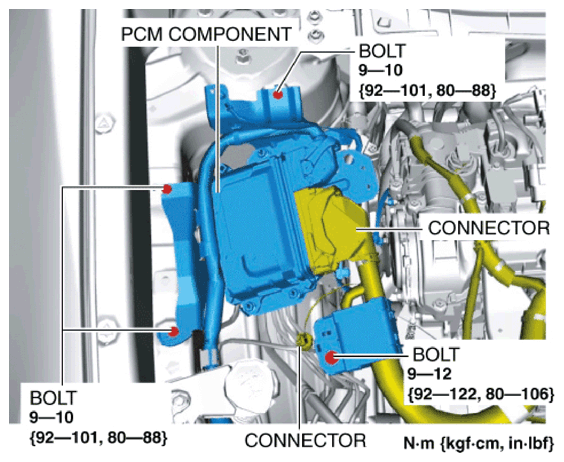 Courtesy of MAZDA MOTORS CORP.
- Remove the bolts.
- Set the PCM component out of the way.
- Disconnect the connector.
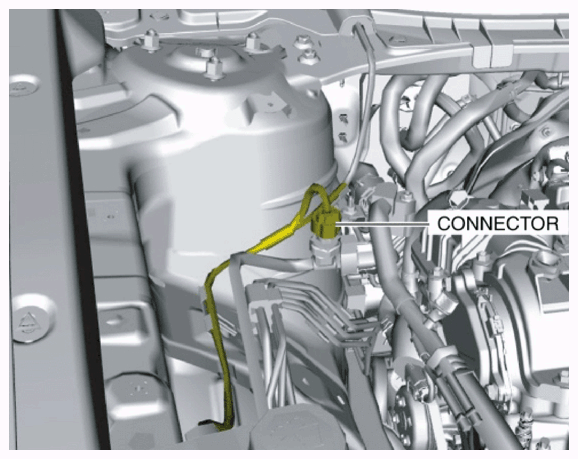 Courtesy of MAZDA MOTORS CORP.
- Loosen the refrigerant pressure sensor using two spanners.
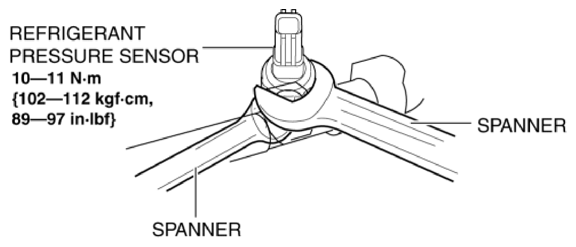 Courtesy of MAZDA MOTORS CORP.
- Remove the refrigerant pressure sensor.
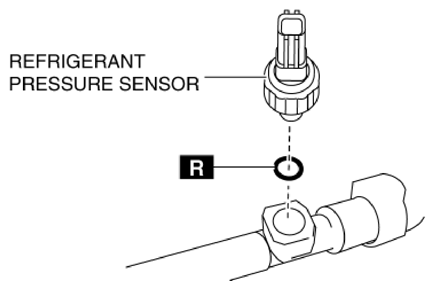 Courtesy of MAZDA MOTORS CORP.
CAUTION:
- If moisture or foreign matter enters the refrigeration cycle, cooling ability will be lowered and abnormal noise will occur. Always immediately plug all open fittings after removing any refrigeration cycle parts to keep moisture or foreign matter out of the cycle.
- Install in the reverse order of removal. (Refer to REFRIGERANT PRESSURE SENSOR INSTALLATION NOTE .)
- Perform the refrigerant system performance test. (Refer to REFRIGERANT SYSTEM PERFORMANCE TEST
.)