LF Control Unit Removal/Installation
- Disconnect the negative battery cable. (See NEGATIVE BATTERY CABLE DISCONNECTION/CONNECTION
).
- Remove the scuff plate (RH). (See SCUFF PLATE REMOVAL/INSTALLATION
).
- Remove the front side trim (RH). (See FRONT SIDE TRIM REMOVAL/INSTALLATION
).
- Disconnect the connector.
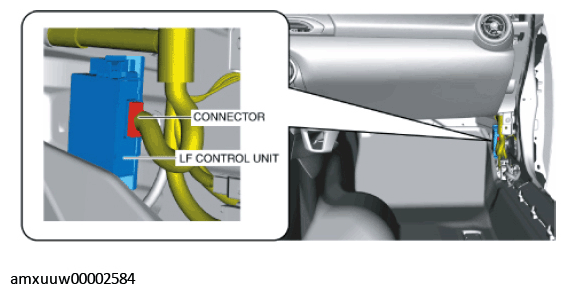 Courtesy of MAZDA MOTORS CORP.
- While pressing the tabs in the directions of arrows (1) shown in the figure, pull the LF control unit in the direction of arrow (2) to detach the LF control unit from the LF control unit bracket.
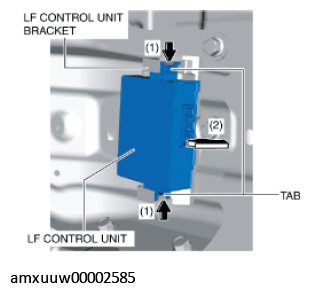 Courtesy of MAZDA MOTORS CORP.
- Remove the LF control unit from the LF control unit bracket.
- When replacing the LF control unit bracket, perform the following procedure.
- Remove the bolt.
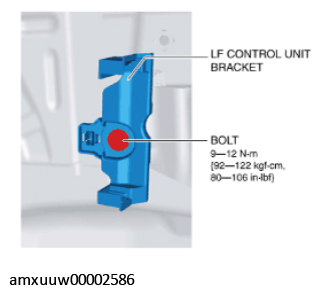 Courtesy of MAZDA MOTORS CORP.
- While pressing the tabs in the directions of arrows (1) shown in the figure, pull the LF control unit bracket in the direction of arrow (2) to detach the LF control unit bracket tabs from the body.
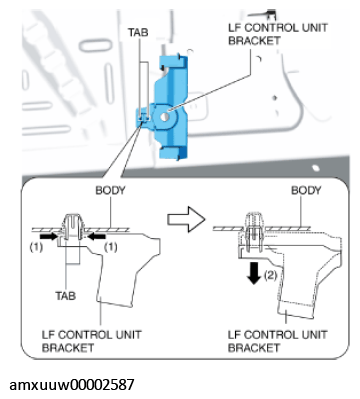 Courtesy of MAZDA MOTORS CORP.
- Remove the LF control unit bracket from the body.
- Install in the reverse order of removal.