SiriusXM travel link®
- Displays the SiriusXM travel link® information.
SiriusXM travel link® verification procedure
- Select the "Information" button on the Home screen.
- Select [SiriusXM travel link] on the information screen to display the guidance.
- The buttons on the menu screen operate as follows:
| Display |
Menu |
Explanation |
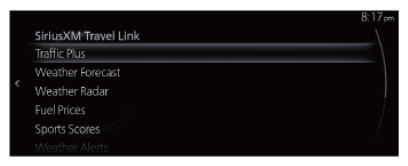 Courtesy of MAZDA MOTORS CORP. Courtesy of MAZDA MOTORS CORP.
|
Traffic Plus |
Displays continuously updated traffic information on the navigation screen in real time. |
| Weather Forecast |
Displays the weather forecast. |
| Weather Radar |
Displays items such as weather radar, severe storms, and tropical storm information on the navigation screen. |
| Fuel Prices |
Displays information for gas stations. |
| Sports Scores |
Displays a list of each genre list and the game schedules and match results for teams selected from the list. You can check on the details of a team by registering the team to "My Teams". Up to 50 items can be registered. |
| Weather Alerts |
Displays weather information, warnings, and security alerts. You can also turn the notifications on/off by selecting or deselecting the checkbox of "Alert Notifications". |
| Parking Information |
Displays information for parking areas. |
| Subscription Status |
You can check the status of each service subscription. |