Using ANTI-LOCK Warning Light
- To retrieve stored DTCs, locate Data Link Connector (DLC) located under driver side of dash. Turn ignition switch off. Ground DLC terminal No. 1. See Fig 1
.
- If DTCs are stored in ECU memory, ANTI-LOCK warning light will began to flash intermittently. Long flashes represent first digit of DTC; short flashes represent second digit. For example, 4 long flashes and 3 short flashes indicate DTC 43. If 2 or more DTCs are stored, lowest number will be displayed first. DTC 51 will always be displayed if valve relay is removed.
- After recording DTC(s), see DIAGNOSTIC TROUBLE CODE DEFINITION
table. If no DTCs are stored, ANTI-LOCK warning light will flash constantly.
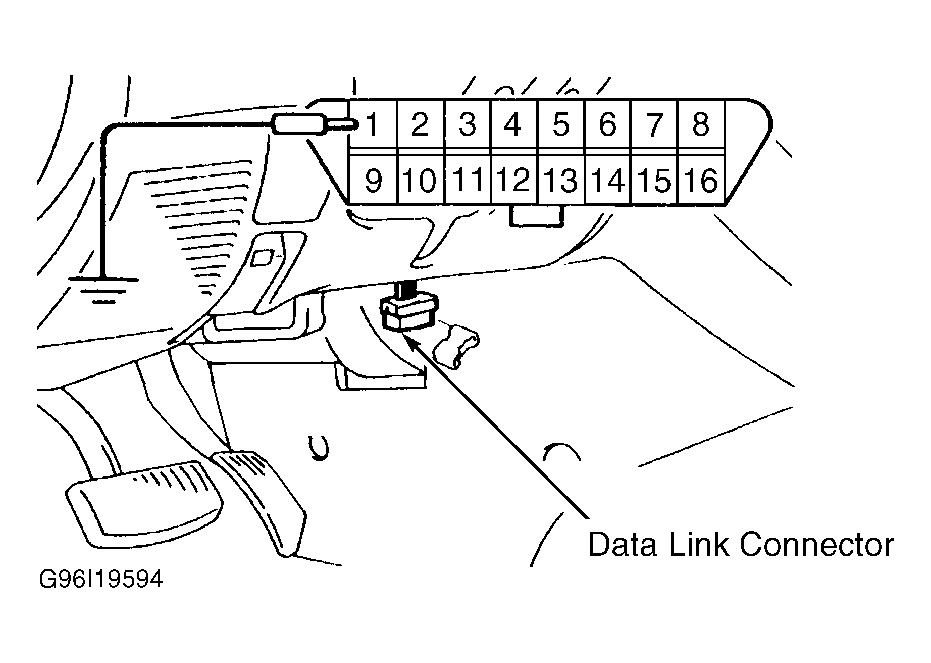 Courtesy of MITSUBISHI MOTOR SALES OF AMERICA.
 DIAGNOSTIC TROUBLE CODE DEFINITION
| DTC |
System Affected |
| 11 |
Right Front Wheel Speed Sensor (Open/Short) |
| 12 |
Left Front Wheel Speed Sensor (Open/Short) |
| 13 |
Right Rear Wheel Speed Sensor (Open/Short) |
| 14 |
Left Rear Wheel Speed Sensor (Open/Short) |
| 15 |
Wheel Speed Sensor Output Signal Fault |
| 16 |
ECU Power Supply |
| 21 |
Right Front Wheel Speed Sensor (Gap) |
| 22 |
Left Front Wheel Speed Sensor (Gap) |
| 23 |
Right Rear Wheel Speed Sensor (Gap) |
| 24 |
Left Rear Wheel Speed Sensor (Gap) |
| 38 |
Brakelight Switch Circuit |
| 41 |
Right Front Solenoid Valve |
| 42 |
Left Front Solenoid Valve |
| 43 |
Rear Solenoid Valve |
| 51 |
Valve Relay |
| 53 |
Motor Relay Or Motor |
| 63 |
Faulty ECU |