Inspection Using Scan Tool MB991502 Data List
- Connect scan tool MB991502 to the data link connector. See Figure.
- Turn the ignition switch to the "ON" position.
- Carry out inspection by means of the data list. See Fig 1. If there is an abnormality, check and repair the chassis harnesses and components.
- Re-check using scan tool MB991502 and check to be sure that the abnormal input and output have returned to normal because of the repairs.
- Erase the diagnostic trouble code(s). See ERASING DIAGNOSTIC TROUBLE CODES .
- Turn the ignition switch to the "LOCK" (OFF) position.
- Disconnect scan tool MB991502 from the data link connector.
- Start the engine again and do a test drive to confirm that the problem is eliminated.
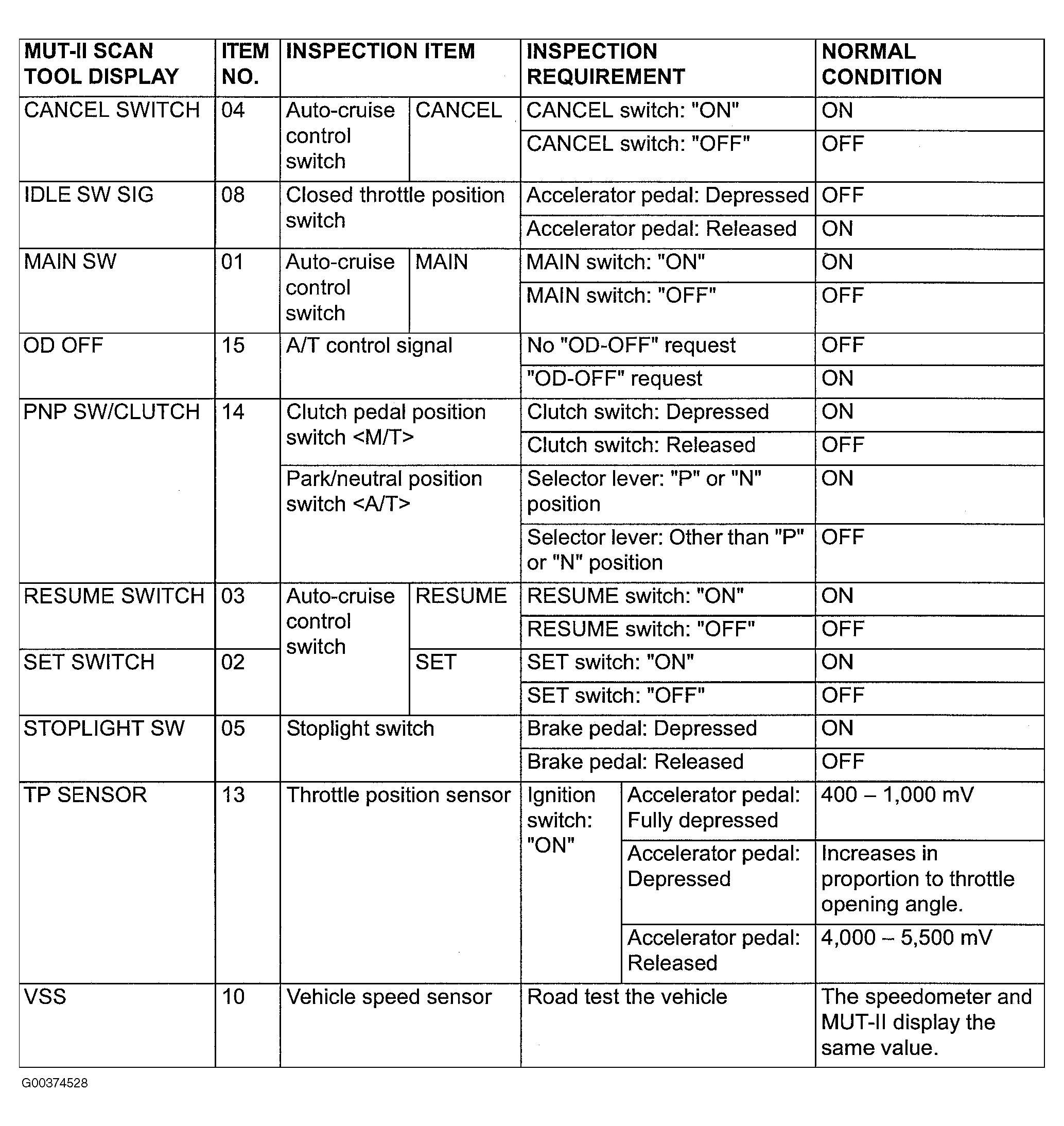 Courtesy of MITSUBISHI MOTOR SALES OF AMERICA.