Remote Control Completely Inoperative
- Check Remote Transmitter
Check or replace battery in remote transmitter. Battery voltage should be 2.5-3.0 volts. If battery is okay, replace remote transmitter with new or known-good unit, and enter identity code of new remote transmitter. See TRANSMITTER PROGRAMMING
. If new remote transmitter cannot be reprogrammed, go to next step.
- Check Antenna
Disconnect remote control antenna harness connector. See COMPONENT LOCATIONS
. Visually check antenna and lead for damage. See Fig 1
. Ensure antenna filament lines are not broken. Repair or replace if necessary. If antenna is okay, go to next step.
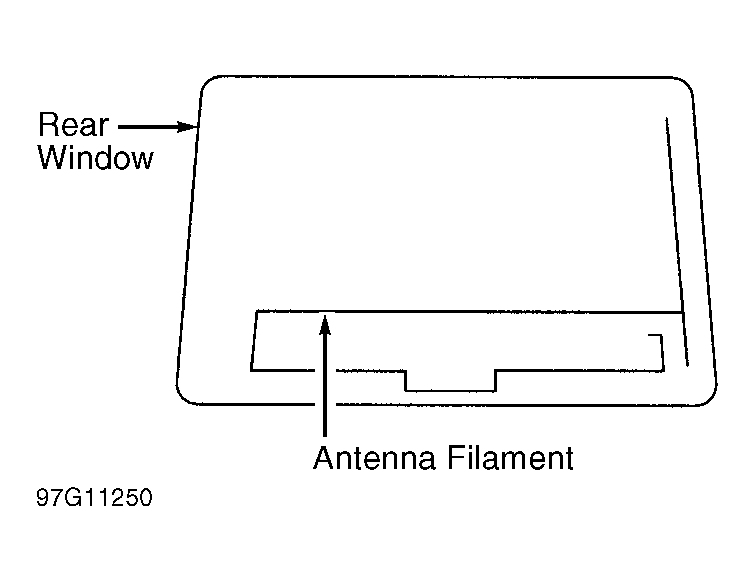 Courtesy of NISSAN MOTOR CO., U.S.A.
- Check Antenna Circuit For Open
Disconnect 1-pin harness connector from Local Control Unit (LCU) No. 5. Check continuity between antenna connector and 1-pin control unit harness connector terminal. If continuity exists, go to next step. If continuity does not exist, repair open antenna circuit.
- Check Antenna Circuit For Short To Ground
Check continuity between antenna harness connector and chassis ground. If continuity exists, repair short to ground in antenna circuit. If continuity does not exist, antenna is okay. Go to step 6).
- Check Multiplex System
Ensure Local Control Unit No. 5 (LCU 05) is operating and communicating properly with BCM (Mode I diagnostics). Also ensure LCU 05 is receiving remote transmitter signals (Mode II diagnostics). See MULTIPLEX CONTROL SYSTEM
article. Repair any faults found. If all systems test okay, replace LCU 05.