CAN Communication Line Check: Notes
- CHECK MONITOR DESCRIPTION
- Start display control unit self-diagnosis. Refer to
"SELF-DIAGNOSIS MODE (DCU) ".
- Select "CAN DIAG SUPPORT MONITOR". Refer to
"CAN DIAG SUPPORT MONITOR ".
MONITOR DESCRIPTION
| Item |
content |
Error counter |
| Normal condition |
Erorr (Example) |
| CANCOMM |
OK |
NG |
0-50 |
| CAN_CIRC_1 |
OK |
UNKWN |
0-50 |
| CAN_CIRC_2 |
OK |
UNKWN |
0-50 |
| CAN_CIRC_3 |
OK |
UNKWN |
0-50 |
| CAN_CIRC_4 |
OK |
UNKWN |
0-50 |
| CAN_CIRC_5 |
OK |
UNKWN |
0-50 |
| CAN_CIRC_6 |
OK |
UNKWN |
0-50 |
| CAN_CIRC_7 |
OK |
UNKWN |
0-50 |
| CAN_CIRC_8 |
OK |
UNKWN |
0-50 |
| CAN_CIRC_9 |
OK |
UNKWN |
0-50 |
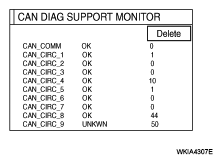 Courtesy of NISSAN MOTOR CO., U.S.A.
- Record each item display description (OK/NG/UKNWN) displayed on the following CAN DIAG SUPPORT MONITOR Check Sheet.