DTC B1372: Device Ignition No. 1 Circuit Low
- Turn ignition on. Using scan tool, select BCM SECURITY DATA DISPLAY, IGNITION 1 state. If IGNITION 1 state does not display HIGH, go to next step. If IGNITION 1 state displays HIGH, problem is intermittent. Check for poor connection to BCM. See COMPONENT LOCATIONS . Repair as necessary and retest operation.
- Check BCM/ECM/CRUISE/ABS fuse (10-amp), located in underhood fuse block. See COMPONENT LOCATIONS . If fuse is okay, go to next step. If fuse is blown, repair short to ground in Pink wire between BCM/ECM/CRUISE/ABS fuse and Gray 24-pin BCM connector J2 terminal A10. See Fig 1. See WIRING DIAGRAMS . Replace BCM/ECM/CRUISE/ABS fuse and retest operation.
- Ensure ignition is on. Connect DVOM (backprobe) between ground and Gray 24-pin BCM connector J2 terminal A10 (Pink wire). See Fig 1. See WIRING DIAGRAMS . If battery voltage exists, go to next step. If battery voltage does not exist, repair open in Pink wire between BCM/ECM/CRUISE/ABS fuse and Gray 24-pin BCM connector J2 terminal A10. Retest operation.
- Check for poor connection to BCM. Repair as necessary and retest operation. If BCM connection checks okay, replace BCM. See BODY CONTROL MODULE under REMOVAL & INSTALLATION. Retest operation.
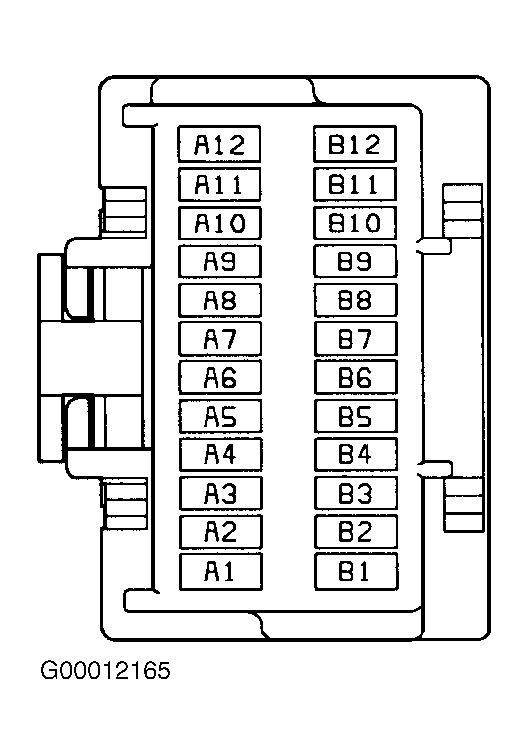 Courtesy of GENERAL MOTORS CORP.