Function Check Mode
- Connect the test mode connector located under the glove box.
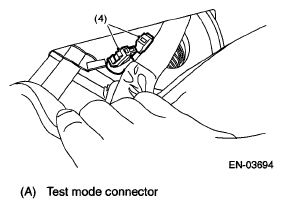 Courtesy of SUBARU OF AMERICA, INC.
- Turn the ignition switch to ON (engine OFF) and turn the Subaru Select Monitor switch to ON.
- On the «Main Menu» display screen, select the {Each System Check} and press the [YES] key.
- On the «System Selection Menu» display screen, select the {Brake Negative Pressure Pump System} and press the [YES] key.
- Press the [YES] key after the {3.0 DOHC} is displayed.
- On the «Negative Pressure Pump Diagnosis Menu» display screen, select the {Function Check Mode} and press the [YES] key.
- When the "Start Function Check Mode" is shown on the screen, press the [YES] key.
- When the "Depress the Brake Pedal 5 Times" is shown on the screen, depress the brake pedal 5 times, and press the [YES] key while brake pedal is not depressed.
- Press the [YES] key after the {OK} is displayed.