Navigation system
CAUTION:
When replacing the navigation unit, be sure to replace with specified navigation unit. The marker adjustment can not be performed correctly if replacing with unspecified navigation unit.
- When the map screen is displayed, press the (b) key for one second while pressing the (a) key + (c) key.
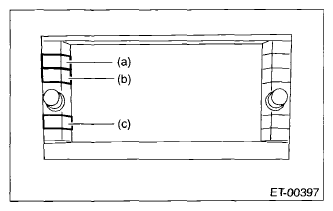 Courtesy of SUBARU OF AMERICA, INC.
- When the Maker Line Diag menu screen is displayed, confirm the < P > key is selected. If the < P > key is not selected, select the < P > key. (Press)
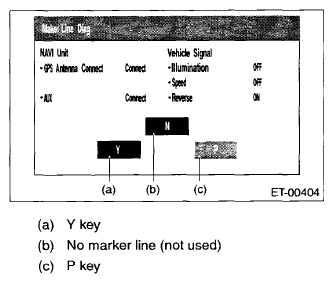 Courtesy of SUBARU OF AMERICA, INC.
- Turn the ignition switch to OFF and wait for 60 seconds or more before finishing the procedures.
CAUTION:
Do not turn the ignition switch to ON or disconnect the ground cable from battery within 60 seconds after turning the ignition switch to OFF. The navigation unit data updating can not be performed correctly.