Computer Circuit
- Disconnect electrical connector from cruise control computer. Check for continuity between terminal No. 13 and body ground. See Fig 1. If no continuity is present, check for open between terminal No. 13 and body ground and check for faulty ground connection.
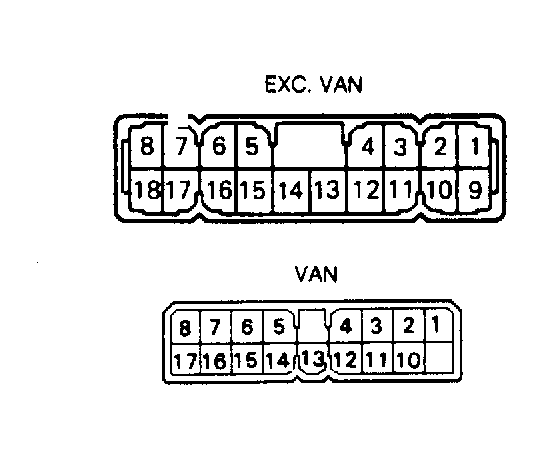 Courtesy of © TOYOTA, LICENSE AGREEMENT TMS1002
- If continuity is present, check for battery voltage between harness connector terminal No. 10 and body ground with main switch turned on. If voltage is not present, check for open between terminal No. 10 of computer and terminal No. 6 (terminal No. 21 on MR2 and terminal No. 4 on Van) of main (control) switch.
- If voltage is present, connect terminal No. 3 (terminal No. 9 on Van) to body ground. Indicator light should glow with main switch turned on. If indicator light does not glow, check for open between terminal No. 3 (terminal No. 9 on Van) of computer and terminal No. 4 (terminal No. 18 on MR2) of main (control) switch.
- If indicator light did glow, disconnect main (control) switch connector. Check for continuity between terminal No. 3 (terminal No. 9 on Van) and body ground. If no continuity is present, check for short between terminal No. 3 (terminal No. 9 on Van) of computer and terminal No. 4 (terminal No. 18 on MR2) of main (control) switch. If no continuity is present, replace computer.