Navigation Receiver: Removal
- REMOVE INSTRUMENT CLUSTER NO.1 FINISH PANEL CENTER
(See
REMOVAL
)
- REMOVE INSTRUMENT CLUSTER NO.2 FINISH PANEL CENTER
- REMOVE INSTRUMENT CLUSTER FINISH PANEL GARNISH
(See
REMOVAL
)
- REMOVE NAVIGATION RECEIVER ASSEMBLY WITH BRACKET
- Remove the 4 screws.
- Disconnect the connector and remove the navigation receiver assembly with bracket.
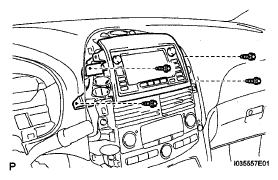 Courtesy of TOYOTA MOTOR SALES, U.S.A., INC.
- REMOVE INSTRUMENT CLUSTER FINISH PANEL UPPER
- Remove the 4 screws and the instrument cluster finish panel upper.
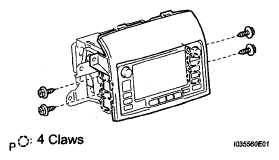 Courtesy of TOYOTA MOTOR SALES, U.S.A., INC.
- REMOVE NO.1 NAVIGATION BRACKET
- Remove the 4 screws and the No.1 navigation bracket.
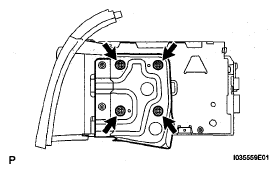 Courtesy of TOYOTA MOTOR SALES, U.S.A., INC.
- REMOVE NO.2 NAVIGATION BRACKET
- Remove the 4 screws and the No.2 navigation bracket from the navigation receiver assembly.
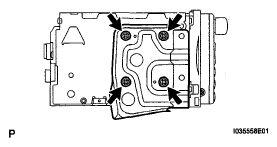 Courtesy of TOYOTA MOTOR SALES, U.S.A., INC.