| 1 |
REPLACE STEERING LOCK UNIT
Replace the steering lock unit. (See STEERING WHEEL AND COLUMN REMOVAL/INSTALLATION
.) |
Go to the next step. |
| 2 |
CLEAR IGNITION KEY ID NUMBERS
- Connect the M-MDS to the DLC-2. (See M-MDS Connecting Procedure .)
- Turn the ignition switch to the ON position using key 1.
NOTE:
Although the security light starts flashing and DTC 15 is displayed after approx. 1 min.
, this does not indicate an improper procedure. Continue to perform the procedure as indicated.
- After vehicle identification, select the following from the M-MDS initial screen.
- Using an IDS (laptop PC)
- Select the "Body"
- Select the "Security"
- Select the "PATS function"
- Using a PDS (Pocket PC)
- Select the "Programming"
- Select the "PATS function"
- Select "Ignition Key Code Erase and Program" from the M-MDS screen menu.
- Perform the security access according to the directions on the M-MDS screen. (See SECURITY ACCESS PROCEDURE .)
|
Go to the next step. |
| 3 |
PERFORM IGNITION KEY ID NUMBER PROGRAMMING
- Program two keys according to the directions on the M-MDS.
- Verify that the PATS function menu is displayed again on the M-MDS screen.
|
Go to the next step. |
| 4 |
PERFORM STEERING LOCK UNIT PROGRAMMING
- Select "Steering Lock Unit Programming" from the M-MDS screen menu.
- Complete the Steering Lock Unit Programming according to the directions on the M-MDS. (See STEERING LOCK UNIT ID CODE REGISTRATION [ADVANCED KEYLESS ENTRY AND START SYSTEM] .)
- After verifying that the PATS function menu is displayed again on the M-MDS screen, select "Finish (this menu)".
- Turn the ignition switch to the LOCK position.
- Disconnect the M-MDS from the DLC-2.
- Remove the programmed card key from the vehicle.
|
Go to the next step. |
| 5 |
VERIFY KEY 1 PROGRAMMING PERFORMED CORRECTLY
- Start the engine using key 1.
- Verify that the security light and keyless warning light operate as shown in the following figure.
- Turn the ignition switch to the LOCK position and remove key 1.
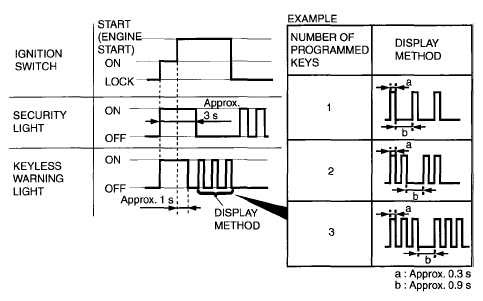 Courtesy of MAZDA MOTORS CORP. Courtesy of MAZDA MOTORS CORP.
|
Go to the next step. |
| 6 |
VERIFY KEY 2 PROGRAMMING PERFORMED CORRECTLY
- Start the engine using key 2.
- Verify that the security light and keyless warning light operate as shown in the following figure.
- Turn the ignition switch to the LOCK position and remove key 2.
- Are there other keys to be programmed?
Courtesy of MAZDA MOTORS CORP.
|
Yes |
Repeat Step 6 using each programmed key. |
| No |
Go to the next step. |
| 7 |
VERIFY CAR KEY PROGRAMMED PERFORMED CORRECTLY
- Bring the programmed card key into the vehicle.
- Close all doors.
- Remove the key from the key cylinder and place it on the front passenger seat.
- Start the engine using the card key.
- Verify that the security light and keyless warning light operate as shown in the following figure.
- After verify that the keyless warning light turns off, turn the ignition switch to the LOCK position.
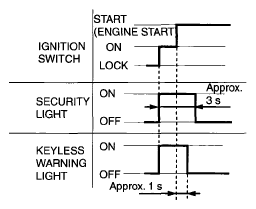 Courtesy of MAZDA MOTORS CORP. Courtesy of MAZDA MOTORS CORP.
|
Go to the next step. |