Test No. 1
- Check SECURITY Indicator Light
Remove instrument cluster from instrument panel. See INSTRUMENT PANELS article. Note connector and terminal identification on rear of instrument cluster. See Fig 1.
- Connect positive battery terminal to connector "C" terminal No. 5 (meter-side) and negative battery terminal to connector "C" terminal No. 2 (meter-side) on rear of instrument cluster. See Fig 1. Go to next step.
- Note if SECURITY indicator light illuminates. SECURITY indicator light is located near center of tachometer or engine coolant/fuel gauge assembly on right side of instrument panel, depending on type of instrument cluster. If SECURITY indicator light illuminates, go to next step. If SECURITY indicator light does not illuminate, replace instrument cluster. See INSTRUMENT PANELS article.
- Check SECURITY Indicator Light Wiring
Check for loose or defective connectors. Check Green/Red wire between anti-theft system Electronic Control Unit (ECU) and instrument panel connector "C" and White/Black wire between instrument panel connector "C" and body ground. See WIRING DIAGRAMS . Anti-theft system ECU is located behind center of instrument panel, near instrument panel cluster and uses a 9-pin electrical connector and a 25-pin electrical connector. See Figure. If connectors and wiring are okay, go to next step. If connectors or wiring are defective, repair as necessary.
- Replace Anti-Theft System ECU
Replace anti-theft system ECU. See ANTI-THEFT SYSTEM ECU under REMOVAL & INSTALLATION. Check system operation. If anti-theft system still cannot be set, go to next test listed. See TROUBLE SHOOTING SYMPTOMS under TROUBLE SHOOTING.
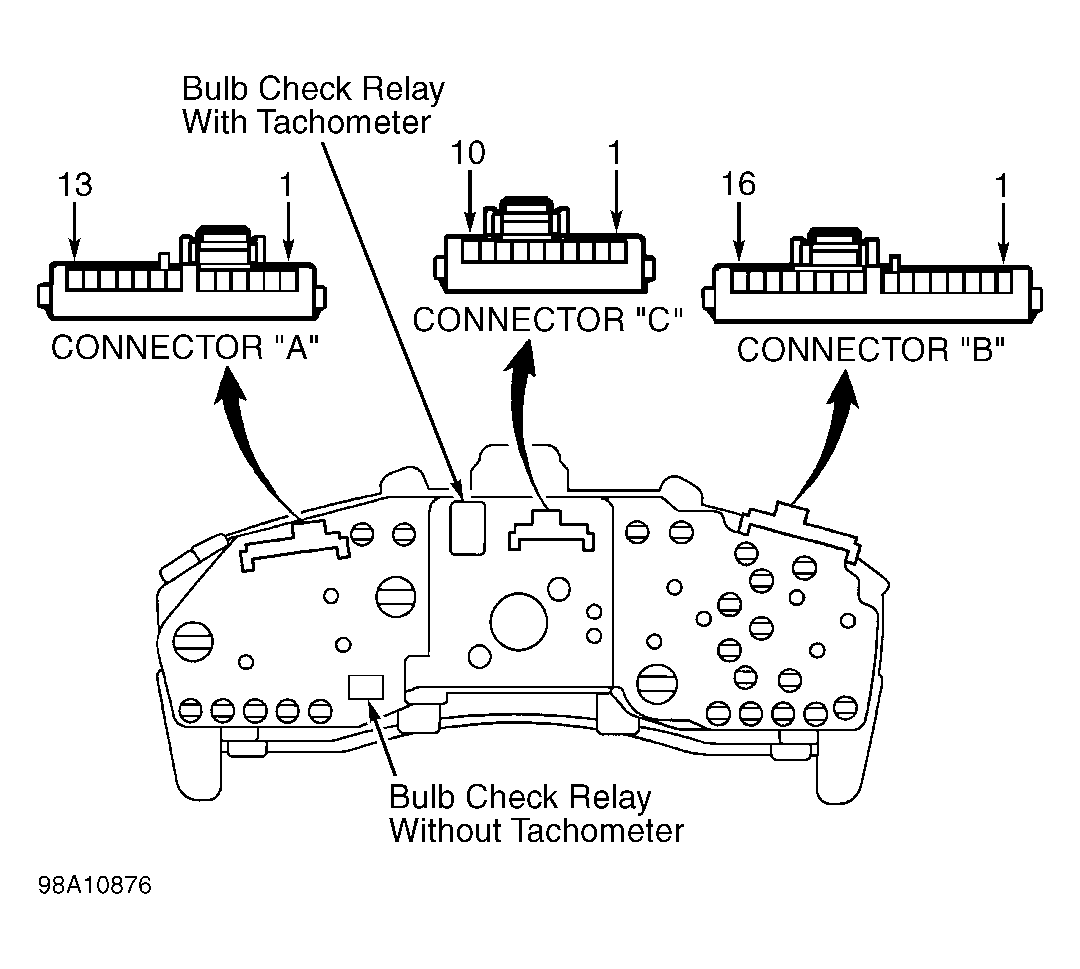 Courtesy of © TOYOTA, LICENSE AGREEMENT TMS1002